
PackML gives packaging machines one unit mode model, one standard state model, and standard tags, so a line controller can command and read every machine the same way.
A packaging line usually combines machines from several builders, each with its own PLC platform, program structure, and tag names. A line controller that starts, stops, and reports on every machine then needs a custom integration for each one. PackML, the packaging machine language that OMAC developed and ISA adopted as ISA-TR88.00.02, solves this with a common model of modes, states, commands, and tags, built on the ISA-88 batch control concepts.
This article explains the core model, how to map it to PLC code, and the pitfalls of inconsistent implementations. The OPC Foundation's PackML companion specification supplies the state and mode names used here, and the ISA edition should be confirmed before any interface specification is written. For the wider batch context, see batch control with ISA-88 standards.
Why a common state model matters on a line
Without a shared model, every machine exposes its own status words, alarm groups, and start sequences. The line controller then needs custom logic for each machine, and operators learn a different vocabulary at every station. PackML aims at a common look and feel across a plant floor, and at behaviour that does not depend on the control platform.
The companion specification defines the same idea technically: state models for external control, a mode model that selects the applicable state model, and standard tag names and values.
- Integration: the supervisory system sends the same commands to every machine and reads the same status values.
- Testing: one test script that drives the standard states can check any conforming machine before it reaches the line.
- Reporting: standard count and status tags give MES and OEE tools a consistent basis for run, stop, and count data.
Unit modes decide which states apply
PackML separates the mode from the state. The mode says what the unit is trying to do, and it determines which states and transitions are available. The companion specification's default enumeration defines three modes: Produce (value 1), Maintenance (value 2), and Manual (value 3). A server may add modes, but any additional mode must start at value 4.
Treat the table as a starting point. The machine builder's mode and state tables are the authority for a specific machine.
| Mode | Purpose | Constraint or caution |
|---|---|---|
| Produce (1) | Routine production of the job | Includes Suspended and Complete |
| Maintenance (2) | Run the unit independently of the other machines on the line | Suspended and Complete are not available in this mode |
| Manual (3) | Direct control of individual machine elements | Needs its own safety review before use |
| Vendor modes (4 and up) | Machine-specific modes, such as cleaning or calibration | Document each one in the interface list |
The state model: running, pausing, stopping, and recovering
Running and pausing
Execute is the state in which the unit carries out the active mode. In production mode, that means making product. Holding and Suspending both pause Execute, but the cause differs. Holding responds to conditions inside the machine, such as low material levels or a need for operator service. Suspending responds to conditions outside the machine, such as an upstream shortage or a downstream blockage. Each pause has a waiting state, Held or Suspended, and a return path, Unholding or Unsuspending, that completes the restart steps before Execute resumes.
Stopping, aborting, and resetting
Stopping brings the unit to a controlled stop and ends in Stopped. Aborting can be entered at any time on the Abort command or on a machine fault. It brings the unit to a rapid safe stop, and an emergency stop trips the machine's safety system and also signals the Abort state. Aborted can be left only through an explicit Clear command, after the faults are corrected. Resetting attempts to clear standing errors and stop causes, and it moves to Idle when it succeeds. The specification states that no hazardous motion should occur in Resetting.
Completion and the acting or waiting reading
When the job reaches its defined threshold, for example the required product count, Execute moves to Completing, which shuts the process down, and then to Complete. A useful reading aid groups states as acting, where the unit performs a transition that finishes on its own, such as Starting or Completing, or as waiting, where it waits for a command or condition, such as Idle, Held, or Complete. The companion text does not define these terms, so rely on the state names in the tag list.
Mapping the model to PLC code
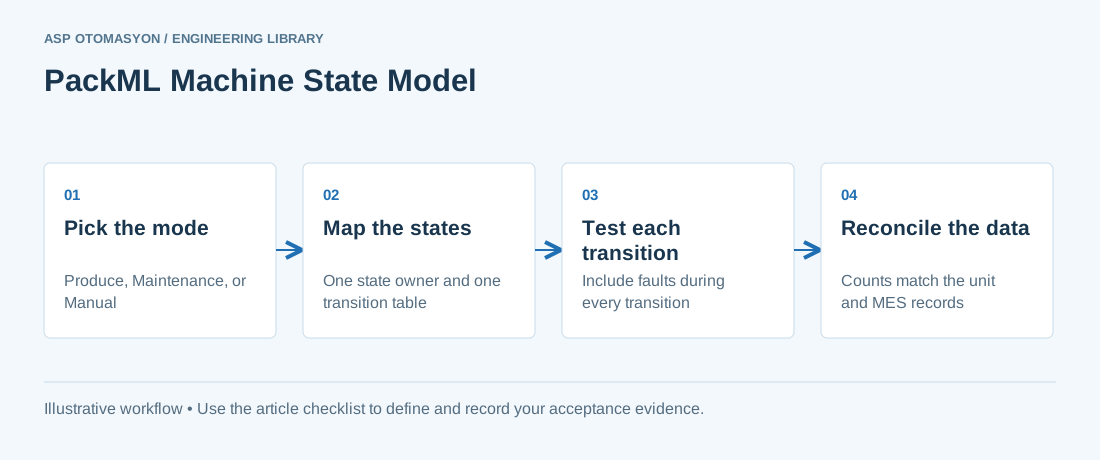
- Assign one state owner. One state machine, in one program unit, sets the current state. Other code and the HMI request transitions, and the state owner accepts or rejects them.
- Write the transition table first. For each state, list the allowed commands and conditions, the next state, and the outputs that must be safe during the transition. A sequential function chart suits this pattern; see SFC programming for process sequences. Check the table against the state list for each mode.
- Keep the stop paths independent of the state logic. Abort and emergency-stop functions must act even if the state program faults. Safety functions belong to the safety system, and design, validation, and bypass decisions belong to qualified functional-safety engineers under the applicable standard.
- Map commands and status to the standard tags. Use the standard command and status tags. List every extension in the interface document, with its meaning and units.
- Test every transition, including faults during transitions. Drive each command from each state where it is valid, and force faults during Starting, Holding, Suspending, and Aborting. Record the resulting state and time for each test.
- Check the tag interface before handover. Confirm names, types, and value ranges against the companion specification. The coding conventions that support this check are in PLC programming best practices.
Counts, OEE, and MES reporting
PackML defines count tags for consumed material, processed product, and defective product. The companion specification notes that the processed count minus the defective count gives the non-defective output, which is the quality input an OEE calculation needs. Time in each state is the availability input, but the mapping from state to loss category is a site decision. A Held state caused by a material shortage and a Held state caused by a sensor fault are different losses, and the reason codes must say which.
Map the state and reason data to one agreed loss list. The loss list and its calculation rules are covered in OEE methodology and implementation pitfalls and MES downtime reason codes.
Common pitfalls
- Assuming one edition. The companion specification is based on ISA-TR88.00.02-2015, while ISA lists a 2022 edition. Confirm the edition each machine builder implemented, and record any differences.
- Adding transitions silently. The companion specification adds transitions beyond the 2015 model, such as Starting to Holding. A machine that uses them behaves differently from one that does not, so list them in the interface document.
- Letting the mode decide the sequence. Running production sequences in Maintenance mode produces states that the mode does not define. Test what happens when a mode change is requested in each state, and define the allowed cases.
- Trusting state times without a common clock. State durations only support OEE when the unit clock agrees with the historian. See industrial time synchronization.
Apply this to your project
- Confirm the PackML edition, mode list, and state list for each machine, and record the differences.
- Check that every mode exposes only the states its definition allows.
- Test each command from every valid state, and record the resulting state and time.
- Force faults during Starting, Holding, Suspending, and Aborting, and confirm the recovery path for each.
- Confirm with the functional-safety engineer that abort and emergency-stop paths work independently of the state program.
- Reconcile count tags with the unit's own counters and with the MES record for one complete job.
- Document every vendor-specific mode, state, and tag in the interface list.
Follow an ASP project guide to connect the fundamentals with implementation and acceptance.
Frequently asked questions
What is PackML?
PackML, short for Packaging Machine Language, is a standard that OMAC developed and ISA adopted as ISA-TR88.00.02. It defines a unit mode model, a standard state model, and standard tags for commands and status. Machines from different builders then behave the same way to a line controller. It is based on the ISA-88 batch control concepts and is used on many filling, packaging, and assembly lines.
What is the difference between Held and Suspended?
Both pause a machine without producing product, but the cause differs. Held responds to conditions inside the machine, such as low material or a need for operator service, and it returns through Unholding. Suspended responds to conditions outside the machine, such as an upstream shortage or a downstream blockage, and it returns through Unsuspending. In both cases the machine resumes Execute after its restart steps finish.
Which states are available in maintenance mode?
Maintenance mode runs a unit independently of the rest of the line. The companion specification states that Suspended and Complete are not available in that mode, so its state list is shorter than the Produce list. Read the machine's own mode and state table, because vendors can add modes starting at value 4.
Does PackML replace IEC 61131-3 programming?
No. PackML defines the behaviour and tag interface of a machine. IEC 61131-3 defines how the PLC program is written, in languages such as ladder diagram and structured text. A PackML implementation is written in one of those languages, and a sequential function chart is a common way to build the state logic. See PLC programming languages under IEC 61131-3 for the language choices.
Why is PackML needed if a line already uses OPC UA?
OPC UA is a transport and information model, and it does not say what a state or count means. The OPC Foundation's PackML companion specification defines an OPC UA information model for PackML units, so a client reads state, mode, and counts with the same meaning on every machine.
Continue the engineering work
- PLC Programming Best Practices
- Sequential Function Chart (SFC) Programming for Process Sequences
- Packaging Line Automation and Integration
- OEE: Methodology, Calculation and Implementation Pitfalls
- MES Downtime Reason Codes: Making Loss Data Useful to Operations
Browse the related technical library or follow an ASP project guide to plan the implementation sequence.
Primary references and further reading
Use the original specifications and product documentation for implementation details. Examples in this guide are illustrative engineering scenarios, not published project results.