
SCADA (Supervisory Control and Data Acquisition) systems are high-value targets for cyberattacks because they control critical infrastructure — power grids, water treatment plants, oil and gas pipelines, and manufacturing facilities. A successful attack can cause physical damage, environmental harm, and safety incidents. This guide covers essential security hardening measures based on IEC 62443 and NIST SP 800-82.
Network Segmentation
Network segmentation is the single most impactful security measure for SCADA systems. It limits the blast radius of a breach and prevents lateral movement from IT networks to OT networks.
Purdue Model Implementation
Organize your network according to the ISA-95 / Purdue Enterprise Reference Architecture:
- Level 0–1: Process Control — PLCs, RTUs, safety controllers, and field instruments. Isolated network segments with no direct internet access.
- Level 2: Supervisory Control — SCADA servers, HMI stations, and engineering workstations. Isolate from enterprise network using a DMZ.
- Level 3: Operations Management — Historians, MES servers, and batch management. Access to Level 2 through controlled, monitored conduits.
- Level 3.5 (Industrial DMZ) — Not part of the original Purdue Model but widely adopted in practice. Buffer zone between OT (Level 0–3) and IT (Level 4–5). Deploy jump servers, data diodes, and application-layer proxies.
- Level 4–5: Enterprise Network — ERP, email, web services. Never allow direct connections from Level 4 to Level 0–2.
Firewall Rules Example
# OT/IT DMZ Firewall Rules (pseudo-configuration)
# ================================================

# ALLOW: Historian replication from OT to DMZ
ALLOW  Level2_Historian -> DMZ_Historian  PORT=1433  PROTO=TCP

# ALLOW: OPC UA from SCADA server to DMZ gateway
ALLOW  Level2_SCADA -> DMZ_OPCGateway  PORT=49320  PROTO=TCP

# BLOCK: All direct IT-to-OT connections
DENY   Level4_* -> Level2_*  PROTO=ALL  LOG=ON

# BLOCK: All outbound internet from OT
DENY   Level0-2_* -> INTERNET  PROTO=ALL  LOG=ON

# ALLOW: NTP synchronization (one-way)
ALLOW  NTP_Server -> Level2_NTPClient  PORT=123  PROTO=UDP
Access Control
Implement the principle of least privilege across all SCADA system components:
- Role-Based Access Control (RBAC) — Define roles (Operator, Engineer, Administrator, Auditor) with specific permissions. Never share accounts between individuals.
- Multi-Factor Authentication (MFA) — Require MFA for remote access and privileged operations (program downloads, setpoint changes).
- Jump Servers / Bastion Hosts — All remote access must go through a hardened jump server with session recording and time-limited access.
- Privileged Access Management (PAM) — Use a PAM solution to vault credentials, rotate passwords, and audit privileged sessions.
- USB Port Control — Disable or restrict USB ports on SCADA workstations. Use endpoint protection to block unauthorized removable media.
Patch Management
Patching SCADA systems requires a careful balance between security and availability:
- Inventory All Assets — Maintain an up-to-date inventory of all SCADA components: servers, workstations, PLCs, switches, firewalls, and their software versions.
- Vendor Patch Assessment — Subscribe to vendor security advisories (Siemens SIRT, Schneider Electric PSIRT, Rockwell Security). Assess each patch for applicability.
- Test in Lab First — Never apply patches directly to production. Test in a lab environment that mirrors your production configuration.
- Change Window — Apply patches during planned maintenance windows with full backup and rollback procedures documented.
- Compensating Controls — When patches cannot be applied (legacy systems, vendor restrictions), implement compensating controls: micro-segmentation, application whitelisting, enhanced monitoring.
Monitoring and Logging
You cannot defend what you cannot see. Implement comprehensive monitoring:
- Network Monitoring — Deploy an OT-aware Network Detection and Response (NDR) solution that understands industrial protocols (Modbus, DNP3, IEC 104, OPC). Baseline normal traffic and alert on anomalies.
- Host-Based Monitoring — Install lightweight endpoint agents on SCADA servers to detect unauthorized process execution, file changes, and configuration modifications.
- Centralized Logging — Forward all logs (firewall, SCADA application, Windows Event, authentication) to a centralized SIEM platform. Retain logs for a minimum of 12 months.
- Alarm Correlation — Correlate IT security events with OT process alarms. A failed login followed by a PLC program change is a high-fidelity indicator of compromise.
Security Hardening Checklist
| Category | Control | Priority |
|---|---|---|
| Network | Implement OT/IT network segmentation with firewalls | Critical |
| Network | Deploy Industrial DMZ with jump servers | Critical |
| Network | Disable unused switch ports and VLANs | High |
| Access | Implement RBAC with unique user accounts | Critical |
| Access | Enable MFA for remote access and privileged operations | Critical |
| Access | Disable default/vendor accounts and change default passwords | Critical |
| Patching | Maintain hardware/software inventory | High |
| Patching | Subscribe to vendor security advisories | High |
| Patching | Establish patch testing and deployment process | High |
| Monitoring | Deploy OT-aware network monitoring (NDR) | High |
| Monitoring | Centralize logs in SIEM with 12-month retention | High |
| Monitoring | Baseline normal network traffic patterns | Medium |
| Incident | Document SCADA-specific incident response plan | High |
| Incident | Conduct tabletop exercises at least annually | Medium |
| Physical | Secure server rooms with access control | High |
Incident Response
An OT-specific incident response plan must account for safety and operational continuity:
- Preparation — Maintain offline backups of all PLC programs, SCADA configurations, and firewall rules. Store in a physically separate, air-gapped location.
- Detection — Define clear escalation criteria: what constitutes a security incident vs. an operational anomaly. Who has authority to declare an incident?
- Containment — Pre-define containment actions. For a SCADA compromise: isolate the affected network segment, switch to manual control, notify plant operations.
- Eradication — Remove the threat from all affected systems. For ransomware: do NOT pay the ransom. Rebuild from known-good backups and verify integrity.
- Recovery — Restore systems in a controlled manner: verify backups, apply patches, reconfigure security controls, test before returning to production.
- Lessons Learned — Conduct a post-incident review within 72 hours. Document findings and update security controls accordingly.
ASP OTOMASYON A.Ş. and its subsidiaries OPCTurkey and ASP Dijital provide end-to-end industrial engineering solutions for process automation, data operations and AI.
References & Further Reading
- IEC 62443 Series — Industrial Automation and Control Systems Security — International standard series covering security management systems, risk assessment, system security requirements, and secure product development for IACS.
- NIST SP 800-82 Rev.3 — Guide to Industrial Control System (ICS) Security — Official NIST guide providing comprehensive security recommendations for SCADA, DCS, and PLC-based systems, including network architecture and incident response.
- ISA-95 / IEC 62264 — Enterprise-Control System Integration — International standard defining the Purdue Model functional hierarchy for OT/IT network segmentation and data flow management.
- NERC CIP — Critical Infrastructure Protection Standards — North American Electric Reliability Corporation standards for cybersecurity of bulk electric systems, applicable to SCADA security programs.
- SANS — SCADA Security and ICS Best Practices — Authoritative technical guide on securing industrial control systems with practical defense-in-depth strategies and network segmentation patterns.
Validate hardening without losing the operating function
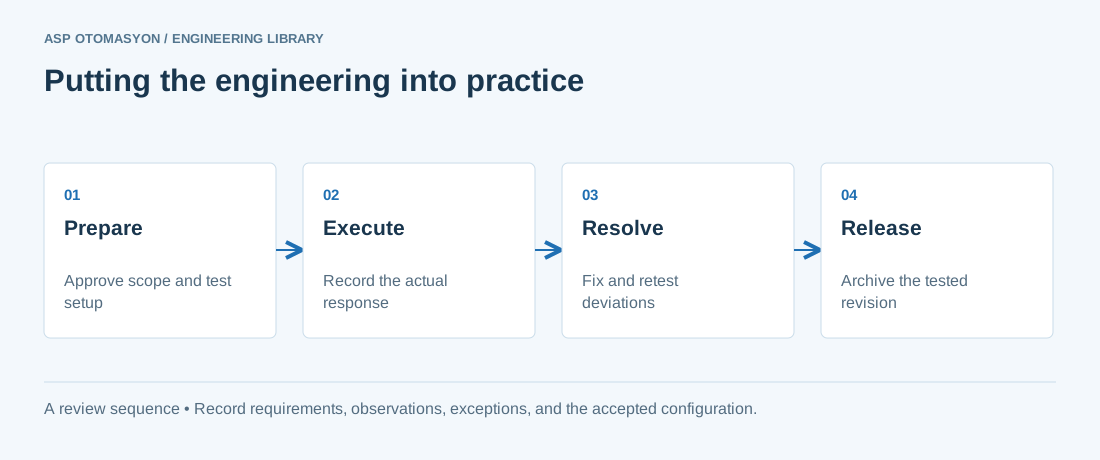
Record a baseline, approve a maintenance or test window, and apply changes in a recoverable sequence. After hardening, verify drivers, services, certificate handling, alarms, historical recording, user roles, and backup jobs. Document justified exceptions with an owner and review date. A disabled service is not automatically an improvement if it breaks an essential operational dependency.
Continue with the related practical guide.
Apply this to your project
- Agree the test boundary and site authorization, especially where outputs or communications can affect operating equipment.
- Record expected and actual values, equipment identifiers, software revision, test conditions, and exceptions.
- Retest changed behavior and archive the final configuration with the test record and recovery instructions.
Follow an ASP project guide to connect the fundamentals with implementation and acceptance.
Primary references and further reading
Use the original specifications and product documentation for implementation details. The examples in this guide are illustrative engineering scenarios, not published project results.