
The way operators interact with industrial processes has not meaningfully changed in decades — until now. The ISA-101.01 standard, "Human-Machine Interfaces for Process Automation Systems," provides a structured framework for designing HMIs that reduce operator error, improve situation awareness, and increase throughput. This article examines the core principles of ISA-101, their practical application, and emerging trends through 2025–2026.
Why it matters: Studies cited in the ISA-101 working group suggest that 70–80% of industrial incidents involve operator error as a contributing factor. In most cases, the root cause is not the operator — it is a poorly designed HMI that obscures critical information beneath visual noise.
The Three Principles of ISA-101
ISA-101.01 is built on three foundational principles that guide every design decision:
- The HMI is a system, not a screen. It encompasses displays, navigation, alarms, trends, procedures, and the physical environment. Every element must be designed holistically.
- Design for the operator, not the engineer. The HMI must reflect the operator's mental model, not the control system architecture. Engineers may think in terms of function blocks and device tags; operators think in terms of unit operations and process flows.
- Performance metrics drive design. Measure operator effectiveness (time to detect, diagnose, and respond to abnormal situations) and use those metrics to iterate the HMI design.
Hierarchical Display Organisation
ISA-101 mandates a hierarchical display structure with three levels, plus an optional fourth:
| Level | Name | Content | Typical Update Rate |
|---|---|---|---|
| 1 | Area/Site Overview | Entire plant or area — KPIs, major alarms, production summary | 5–10 s |
| 2 | Unit/Process Display | Single unit operation — P&ID-like, with PV, SP, OP, mode, alarms | 1–2 s |
| 3 | Detail/Diagnostic Display | Single device or loop — faceplate, trend, tuning parameters | 0.5–1 s |
| 4 | System/Administrative Display | User management, alarm configuration, audit trail (operator access limited) | On demand |
Navigation rule: An operator must be able to reach any Level 3 detail display from any Level 2 display in three clicks or fewer. This rule alone eliminates the "drill-down maze" found in legacy HMIs.
Grayscale Design Philosophy
The most controversial and impactful recommendation in ISA-101 is the grayscale-first approach:
- Normal operations are displayed in muted grays. White or light gray backgrounds with dark gray text. Equipment outlines are thin, light gray lines.
- Color is reserved exclusively for abnormal conditions. Red for alarm, yellow for warning, blue for off-normal-but-not-alarmed states.
- The HMI must be readable in grayscale. If you print the screen on a black-and-white printer, every piece of information must still be distinguishable.
Before and After Example
Legacy HMI (Before ISA-101)
+---------------------------------------------------+
|  [BRIGHT BLUE BACKGROUND]                          |
|  Tank 101                    Tank 102              |
|  Level: [BIG RED] 75.3%     Level: [BIG GREEN] 82.1% |
|  Temp:  [BIG YELLOW] 145C   Temp:  [BIG CYAN] 138C   |
|  [RAINBOW PIPE FLOW ANIMATIONS]                   |
|  [BLINKING ALARM BANNER: "H" FLASHING]             |
+---------------------------------------------------+
ISA-101 Compliant HMI
+---------------------------------------------------+
|  (light gray bg, dark gray text, thin outlines)    |
|  Tank 101                    Tank 102              |
|  Level:  75.3%               Level:  82.1%         |
|  Temp:   145°C  [H]         Temp:   138°C          |
|  (only Tank 101 H limit uses color - yellow text)  |
|  (pipe outlines: thin gray, flow rate in gray)     |
+---------------------------------------------------+
The difference is dramatic. In the legacy version, the operator's eye is drawn to every coloured element simultaneously — including the green tank level that is perfectly normal. In the ISA-101 version, the only element that commands attention is the yellow [H] on Tank 101 temperature, because it is the only abnormal condition.
Faceplate Standards
A faceplate is the standardised detail display for a control loop, motor, valve, or analyser. ISA-101 recommends a consistent layout across all faceplates:
+--------------------------------------------------+
| Tag: FIC-101    Description: Reactor Feed Flow    |
+--------------------------------------------------+
| Mode: AUTO       Current SP: 150.0 m³/h           |
| PV:   148.2 m³/h       OP: 62.5%                 |
| [----|======*===|----------------------------]    |
|      0     148.2     150                       200|
| Alarm: HiHi (160.0)  [A] = Active, unacknowledged|
+--------------------------------------------------+
| Trend [1 min]  ▁▂▃▄▅▆▇█▇▆▅▄▃▂▁                  |
+--------------------------------------------------+
Faceplate design rules:
- Tag name and descriptor always in the same position (top-left).
- PV/SP/OP always in the same relative positions across all faceplates.
- Mode indication (Auto/Manual/Cascade) always in the same location.
- Alarm summary shows the worst active alarm state, not all alarms.
- Trend display shows the last 15 minutes (configurable) with the current value marked.
Alarm Management Integration (ISA-18.2)
ISA-101 does not exist in isolation. It integrates tightly with ISA-18.2 — the standard for alarm management. An HMI cannot be high-performance if it displays poorly designed alarms.
Key Integration Points
- Alarm banner — Shows the most recent unacknowledged alarm. Positioned at the top or bottom of every display, always visible.
- Alarm summary — A list of all currently active alarms, sortable by time, severity, area. Accessible from any display via a dedicated button or function key.
- First-up indicator — When multiple alarms fire in quick succession, highlight the first alarm that initiated the cascade. This is critical for root cause analysis.
- Shelving and suppression — Operators can temporarily shelve known alarms during startups, shutdowns, or maintenance. The HMI must clearly indicate shelved alarms.
- Alarm flooding prevention — If more than N alarms per minute arrive from a single area, the HMI should suppress nuisance alarms and display a "flood in progress" indicator.
Navigation Patterns
ISA-101 defines three primary navigation models, and most production HMIs use a combination of all three:
1. Hierarchical Navigation (Top-Down)
Level 1 → Level 2 → Level 3. The operator drills down from the area overview to a unit display to a detailed faceplate. This is the primary navigation mode.
2. Spatial Navigation (Pan & Zoom)
The operator pans across a large plant layout and zooms into areas of interest. Effective for brownfield sites where operators navigate by physical location ("go to the north end of the mill").
3. Search-Based Navigation
Type a tag name, equipment ID, or area name to jump directly to the relevant display. Essential for large sites (10,000+ tags) where hierarchical navigation is too slow for urgent situations.
2025–2026 Trends in HMI Design
Touchscreen Optimisation
ISA-101 was originally written with mouse-and-keyboard interaction in mind. Modern HMIs must be touch-first:
- Minimum tappable target size: 44 × 44 px (48 px recommended).
- No hover-dependent interactions (tooltips, menus that appear on mouseover).
- Swipe gestures for panning, pinch-to-zoom for detail views.
- Large numeric keypads for setpoint entry (minimum 20 px digit buttons).
- Support for gloved hands — capacitive touch with "glove mode" setting.
Mobile HMIs
Operators increasingly carry tablets or ruggedised smartphones. Mobile HMIs require a separate design, not a shrunken desktop version:
- Role-based information — the maintenance technician sees different data than the shift supervisor.
- Push notifications for alarms — ISA-18.2 compliant alarm routing to mobile devices.
- Offline cache — the mobile HMI should cache the last known good state for areas where Wi-Fi coverage is intermittent.
AI-Assisted Operator Support
The most significant emerging trend is the integration of AI/ML into the HMI layer:
- Anomaly prediction — The HMI highlights equipment where the AI model predicts a failure within the next 30 minutes, before any alarm triggers.
- Procedure guidance — During abnormal situations, the HMI displays the relevant operating procedure step-by-step, with checkboxes for each completed action.
- Natural language query — Operators can type or speak queries like "show me reactor temperature trend for the last hour" instead of navigating menus.
- Operator advisory — AI suggests the most likely root cause of an alarm cascade, ranked by probability, based on historical data.
Caution: AI-assisted HMI features must never hide information from the operator. The system can suggest, highlight, and prioritise, but it must not prevent the operator from seeing raw data. Trust, once lost, is nearly impossible to restore in an operator interface.
Implementing ISA-101: A Practical Workflow
- Audit existing HMIs — Count colours per display, measure navigation depth, list all animated elements. Score each display against ISA-101 criteria.
- Define the colour scheme — Create a palette with exactly 7–9 colours total, all reserved for abnormal states. Normal state uses grayscale.
- Create the display hierarchy — Map every operational scenario to Level 1, 2, or 3. Delete displays that serve no operator purpose.
- Design the faceplate template — One template for control loops, one for motors, one for valves, one for analysers. No exceptions.
- Build and test with operators — ISA-101 explicitly requires operator participation. Put a prototype in front of actual shift operators. Watch them use it. Revise.
- Measure and iterate — Track metrics: time to acknowledge alarm, time to find a specific tag, number of navigation errors per shift. Use these to drive version 2.
Common Pitfalls
- Half-measures — Applying grayscale to backgrounds but keeping rainbow pipe animations. Consistency matters.
- Engineer-driven design — Building the HMI to mirror the DCS controller hierarchy instead of the process flow.
- Too many levels — Creating 7 levels of hierarchy instead of 3. If a display is never used, delete it.
- Ignoring the alarm system — A beautiful HMI that displays 200 alarms per hour is still a failure. Fix the alarms first.
- No operator training — ISA-101 HMIs look radically different from legacy HMIs. Operators need structured training and a transition period.
Key takeaway: ISA-101 is not a cosmetic upgrade. It is a fundamental shift in how we present process information to the human in the loop. The grayscale-is-normal principle alone can reduce operator cognitive load by an order of magnitude. Pair it with proper alarm management (ISA-18.2), a clean hierarchy, and consistent faceplates, and you will measurably reduce incidents, improve throughput, and build operator trust in the automation system.
References & Further Reading
- ISA-101.01-2015 — Human-Machine Interfaces for Process Automation Systems — Official ISA standard defining the lifecycle, design philosophy, and high-performance HMI principles including hierarchical display organisation and grayscale design.
- ISA-18.2 — Management of Alarm Systems for the Process Industries — Companion standard to ISA-101 covering alarm philosophy, identification, rationalisation, design, monitoring, and management of change for process alarm systems.
- ISA-88 / IEC 61512 — Batch Control Standards — International standard for batch control providing the procedural control model and recipe management that HMI faceplates must visualise for operator interaction.
- ISO 9241-110 — Ergonomics of Human-System Interaction — Dialogue Principles — International standard for human-system interaction principles, providing the ergonomic foundation for ISA-101 HMI design and operator interface evaluation.
- ISA-106 — Procedure Automation for Continuous Process Operations — ISA standard extending HMI and procedural automation principles from batch (ISA-88) to continuous process operations, relevant for multi-mode HMI design.
Apply this to your project
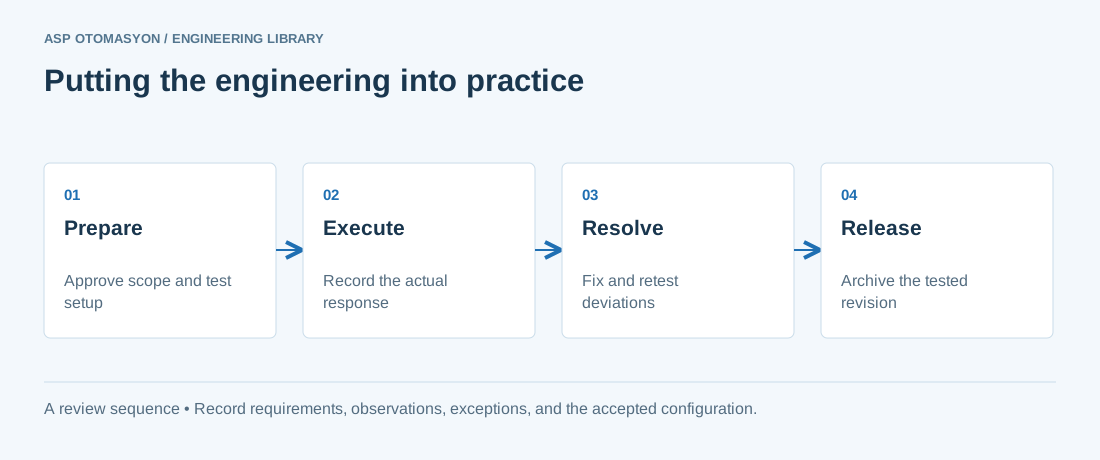
- Agree the test boundary and site authorization, especially where outputs or communications can affect operating equipment.
- Record expected and actual values, equipment identifiers, software revision, test conditions, and exceptions.
- Retest changed behavior and archive the final configuration with the test record and recovery instructions.
Follow an ASP project guide to connect the fundamentals with implementation and acceptance.
Primary references and further reading
Use the original specifications and product documentation for implementation details. The examples in this guide are illustrative engineering scenarios, not published project results.