
Choose an inductive, capacitive, or photoelectric sensor by target material, sensing distance, environment, and output wiring, then confirm the choice against the datasheet.
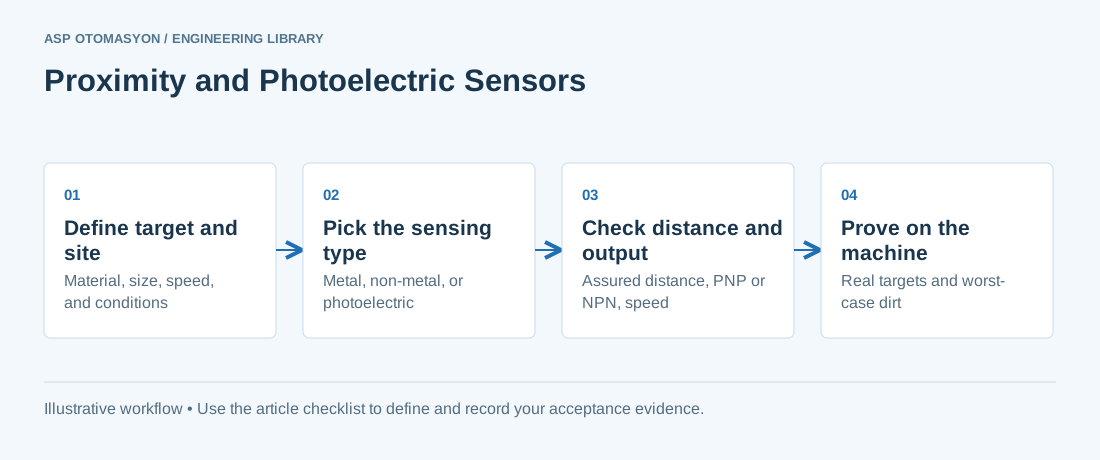
Proximity and photoelectric sensors detect the presence of an object without contact. IEC 60947-5-2 is the international standard for these control-circuit devices. The fourth edition, published in 2019, covers inductive and capacitive proximity switches and photoelectric proximity switches, and also ultrasonic and magnetic types. Choosing among the types depends on target material, distance, environment, and wiring. The datasheet for the chosen device sets the final numbers.
This guide covers the principles and selection steps for inductive, capacitive, and photoelectric sensors, including mounting, outputs, and IO-Link diagnostics. It is written for machine builders, integrators, and maintenance leads who specify or replace sensors. Ultrasonic and magnetic types are out of scope. Use this guide with the device datasheet, not in place of it.
Sensing principles and target materials
An inductive sensor projects an oscillating electromagnetic field from its face. A metal target in that field draws eddy currents and changes the oscillation, which switches the output. Inductive sensors respond to metals only. A capacitive sensor measures the change in capacitance of its electrode field, so almost any material that alters that field triggers it, including plastics, liquids, and powders. A photoelectric sensor switches when light is interrupted or reflected, so its response depends on the target's size, surface, and color.
Distances, material correction, and mounting
IEC 60947-5-2 defines distance terms for proximity switches, including the rated (nominal) operating distance and the assured operating distance. The nominal figure is a reference under standard conditions. Design against the assured distance, which the datasheet specifies across stated tolerances and temperature. Check the product's own definition, because the standard's terms must be read against each datasheet.
Inductive ranges depend on the target metal. The rated distance applies to a reference target, usually mild steel, and the datasheet gives correction factors for aluminum, brass, and stainless steel. Apply the factor, then the design margin. Flush-mounted sensors sit level with surrounding metal and are built for that, while non-flush sensors reach farther but need a metal-free zone. Keep the datasheet's minimum spacing between adjacent inductive sensors to avoid mutual interference.
Capacitive sensing: non-metals, tank levels, and build-up
Capacitive sensors suit non-metallic targets and level detection through the wall of a plastic or glass tank. Sensitivity is set by adjustment and must match the material and wall thickness. The main failure mode is build-up. A film of product, condensate, or dust on the face changes the capacitance and can cause a false ON or a missed OFF. Choose a setting that tolerates normal build-up, clean the face on a schedule, and check the datasheet's grounding and shielding requirements.
Photoelectric modes and environmental limits
Through-beam sensors use separate emitter and receiver. They give the longest range and the most reliable detection of opaque targets, but need two aligned devices. Retro-reflective sensors use a reflector, and a polarizing filter helps with shiny targets. Diffuse sensors use light reflected from the target, so range depends strongly on color and gloss. Background suppression ignores objects beyond a cutoff distance. Fiber-optic heads move the optics into a hot, wet, or hazardous spot.
Contamination is a frequent cause of nuisance trips. Dust, oil mist, or condensation on the lens reduces signal margin, so set an enclosure cleaning schedule. Sunlight, high-bay lighting, and neighboring sensors can interfere, and the datasheet states the modulation and ambient-light immunity the device provides. Where photoelectric sensing cannot be made reliable, machine vision integration is a separate design decision.
Outputs, switching frequency, enclosure, and IO-Link
PNP outputs switch the positive supply to the load, and NPN outputs switch the load to 0 V. Match the sensor output to the input configuration of the PLC module, as its manufacturer documents. IEC 61131-2 sets equipment requirements for programmable controllers, but input wiring is a module-level detail; see PLC I/O wiring.
Switching frequency in the datasheet limits how fast a moving target is detected reliably. Enclosure ratings follow IEC 60529, which classifies protection against solids and liquids. It says nothing about chemical resistance, so check the housing material against cleaning agents separately. IO-Link sensors add parameters and diagnostics through a device description file; see IO-Link smart sensor communication.
- Define the target. Record material, size, shape, color, speed, and whether the target is present or moving.
- Define the site. Record temperature, washdown, dust, oil, ambient light, and vibration.
- Pick the sensing type. Use inductive for metal, capacitive for non-metal and tank levels, and photoelectric for most other targets.
- Check distance at worst case. Use the assured distance and any material factor, then keep a design margin.
- Check outputs and interfaces. Confirm PNP or NPN, the PLC input configuration, switching frequency, and whether IO-Link is needed.
- Prove the choice. Test with real targets, worst-case contamination, and production speed.
Selection table by application
Use the table as a first filter. The datasheet and a test with the real target decide the final choice.
| Application | Typical choice | Main reason | Watch-out |
|---|---|---|---|
| Metal part on a fixture | Inductive, flush or non-flush | Responds to metal only | Apply the correction factor for the metal grade |
| Plastic bottles or cartons | Photoelectric, diffuse or through-beam | Works on non-metal targets | Color and gloss change diffuse range |
| Level through a plastic tank wall | Capacitive | Senses through non-metal walls | Build-up and wall thickness shift the setting |
| Powder or grain in a hopper | Capacitive | Senses non-metal bulk material | Dust and product film need a cleaning plan |
| Presence across a wide conveyor | Through-beam | Longest range on opaque targets | Two devices need alignment and cable routing |
| Shiny metal can on a backdrop | Background suppression, or retro-reflective with polarizing filter | Ignores the backdrop | Test with the actual can; reflection varies |
| Hot or washdown head location | Fiber-optic photoelectric with a rated head | Optics sit away from the hazard | Check head rating and fiber bend limits |
Apply this to your project
- Record the material, size, shape, and speed of the target for every sensing point.
- Confirm the assured distance, material factor, and design margin for every inductive or capacitive point.
- Confirm PNP or NPN output and compatibility with the PLC input configuration.
- Test each sensor with real targets under worst-case contamination and ambient light.
- Record the switching frequency check against production speed.
- Add enclosure rating, cleaning compatibility, and mounting clearances to the drawing; include the sensor in the calibration routine where it is a measured point.
Follow an ASP project guide to connect the fundamentals with implementation and acceptance.
Frequently asked questions
Can an inductive sensor detect aluminum?
Yes, but the sensing distance is reduced compared with mild steel. The datasheet gives a correction factor for aluminum, and that factor applies to the assured distance. Check target size as well, because a small or thin aluminum part may not produce a full signal even within range. Test with the real part.
What is the difference between PNP and NPN outputs?
PNP outputs switch the positive supply to the load, and NPN outputs switch the load to 0 V. The choice must match the input configuration of the PLC module, which the module manufacturer documents. A mismatch usually means the input never sees the correct signal. Confirm before ordering, and label the wiring to match.
Why does a capacitive sensor trigger when nothing has moved?
The most common cause is build-up on the sensing face, such as product film, condensate, or dust, which changes the capacitance. Other causes include a sensitivity setting too high for the material, a change in wall thickness or fill level, and poor grounding or electrical noise. Clean the face on a schedule, re-check the setting with the material in place, and inspect grounding.
Do photoelectric sensors work in direct sunlight?
Some do, when the device offers modulation and enough immunity to ambient light. Test with the installation's actual lighting and sun angle, and shield the sensor where possible. Check the datasheet's immunity figures, and do not rely on a sensor that was tested only indoors.
When is IO-Link worth it for a proximity sensor?
It is worth it when you need remote parameter setting, device diagnostics, or early warning of build-up, drift, or faults, and when the controller and I/O hardware support an IO-Link master. Simple sensors on a fixed setting may not need it. Compare the master and engineering cost against the maintenance benefit.
Continue the engineering work
- IO-Link: Smart Sensor Communication
- PLC I/O Wiring and Termination Best Practices
- Industrial Sensor Calibration — Best Practices and Standards
- IIoT Sensor Integration Patterns
- Machine Vision System Integration for Industrial Inspection
Browse the related technical library or follow an ASP project guide to plan the implementation sequence.
Primary references and further reading
Use the original specifications and product documentation for implementation details. Examples in this guide are illustrative engineering scenarios, not published project results.