
LoRaWAN is a low-power wide-area network (LPWAN) technology designed for battery-powered sensors that transmit small amounts of data over long distances. In industrial facilities, it fills a specific gap: the many measurements that are impractical or uneconomic to wire — tank levels in remote areas, temperature in storage yards, vibration on outdoor assets, energy meters in hard-to-reach cabinets. This article explains LoRaWAN's characteristics, its strengths and limits for industrial use, and how to integrate it with the plant's data architecture.
How LoRaWAN Works
- Radio: LoRa (long-range) uses chirp spread spectrum modulation in the sub-GHz ISM bands (868 MHz in Europe, 915 MHz in the Americas, with regional variations).
- Topology: star-of-stars — end devices talk to gateways, which forward packets over IP to a network server; devices do not relay through each other.
- Capacity: each gateway can serve thousands of devices, but the shared spectrum and duty-cycle regulations limit throughput per device.
- Data rate: roughly 0.3–50 kbit/s depending on spreading factor and region — designed for small periodic payloads (tens of bytes), not streaming.
- Range: line-of-sight ranges of several kilometres in open areas; in industrial environments, hundreds of metres through buildings — still far beyond Wi-Fi.
- Battery life: years from a single battery for sensors reporting a few times per hour.
Device Classes
| Class | Receive behavior | Use case |
|---|---|---|
| Class A | Opens two short receive windows after each uplink | Most battery sensors (default) |
| Class B | Additional scheduled receive windows (beacon-synced) | Devices needing frequent downlinks |
| Class C | Continuously listening (mains-powered) | Actuators and devices needing instant downlinks |
For industrial sensing, Class A is the standard; Class C is used where a device must receive commands immediately (and has power available).
Strengths for Industry
- Cost and effort: no cabling, no gateways per device — one gateway covers a large area.
- Coverage of hard-to-reach places: tanks, silos, yards, roofs, and rotating equipment that would be expensive to wire.
- Simple data: level, temperature, humidity, vibration, energy, open/closed status — exactly the telemetry that fits small periodic payloads.
- Private option: a site can run its own network server (open-source options such as ChirpStack or The Things Stack, or commercial platforms) and keep the data on-premises or in its chosen cloud.
Limits to Respect
- Not for control or real-time data. Latency and throughput are unsuitable for control loops or high-rate monitoring; LoRaWAN is telemetry, not control.
- Duty-cycle and airtime limits. Regional regulations limit transmission time; a device sending large payloads frequently will hit limits. Design payloads small and reporting intervals sane.
- Interference and coexistence. The ISM band is shared; verify link margins and retransmission behavior in dense industrial settings.
- Security is layered. LoRaWAN has built-in encryption (AES-128 network and application keys), but the deployment must manage keys properly and keep the network server patched.
Integration Architecture
Battery sensors (level, temp, vibration, energy)
        │ LoRa (868/915 MHz)
        ▼
Gateways (site coverage)
        │ IP (MQTT/HTTP)
        ▼
Network server (ChirpStack / The Things Stack / commercial)
        │ MQTT / REST / webhook
        ▼
Integration layer (historian, SCADA, IIoT platform, cloud)
Typical integration path:
- Gateways connect to the network server via IP (ethernet, 4G, or Wi-Fi).
- The network server decodes payloads (using the sensor's payload decoder) and publishes values as JSON over MQTT.
- An integration service (edge gateway or cloud function) maps the JSON to the historian, SCADA tags, or the IIoT platform — the same pattern as any other sensor source (see the IIoT sensor integration article).
Planning a Deployment
- Define the use cases and data rates: what is measured, how often, with what resolution? Design payloads accordingly.
- Survey coverage: a site walk with a test device and a portable gateway verifies radio coverage before installing permanent gateways (usually 1–4 per plant).
- Choose devices: pick sensors with proper industrial ratings (IP rating, temperature range) and a supported payload format; check the vendor's decoder availability.
- Run the network server: self-hosted or cloud; configure keys, OTAA (over-the-air activation), and device profiles.
- Integrate data: connect MQTT to the historian/SCADA/cloud and validate end-to-end values against a known reference.
- Monitor and maintain: track battery levels, link quality (RSSI/SNR), and missed messages; replace batteries on schedule.
Common Pitfalls
- Expecting real-time or control performance — the technology cannot deliver it; pick the right tool (wired fieldbus, Wi-Fi, 5G) for those needs.
- Payload bloat: large payloads reduce range and battery life and hit duty-cycle limits; keep packets small.
- Ignoring key management: shared or default keys compromise the network; manage application keys per site/tenant.
- No coverage test: installing gateways before a radio survey leads to dead zones and wasted effort.
- Data without context: a level reading is useless without the tank ID, units, and alarm thresholds; integrate metadata at the network server or integration layer.
Summary
LoRaWAN is the economical answer to a real industrial problem: getting small, periodic measurements from places that are too remote or too costly to wire. It is telemetry-grade, not control-grade — respect its throughput and latency limits, plan coverage, manage keys, and integrate through the network server into the existing historian/SCADA/cloud stack. Used for the right measurements, it unlocks condition monitoring and energy data that would otherwise never be collected.
Apply this to your project
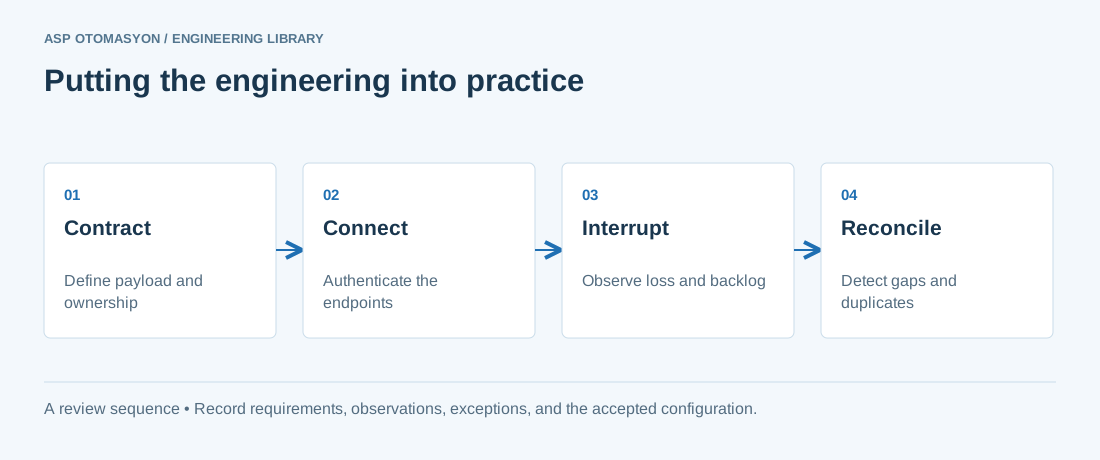
- Specify payload structure, units, identity, time semantics, access permissions, and protocol versions.
- Test backlog growth, connection loss, duplicate delivery, and restart behavior at the consuming application.
- Document how operators see failures and how the system distinguishes replayed data from current process state.
Follow an ASP project guide to connect the fundamentals with implementation and acceptance.
Primary references and further reading
Use the original specifications and product documentation for implementation details. The examples in this guide are illustrative engineering scenarios, not published project results.