
Alarm handling in industrial systems has long been split between the plant's own alarm philosophy and whatever the SCADA vendor happens to provide. OPC UA Part 9 (Alarms and Conditions) defines a standard model for alarms, events, and conditions that works across vendors: a server exposes its alarms as typed objects in the address space, and any compliant client — SCADA, IIoT platform, or dashboard — can display, acknowledge, and manage them with consistent semantics. Combined with ISA-18.2 / IEC 62682 alarm management, Part 9 is the technical backbone of modern alarm integration.
Conditions vs Events
The model distinguishes two notification kinds:
- Events — one-shot facts ("device restarted", "user logged in"): they happen, are reported, and are gone.
- Conditions — states that persist over time ("tank level HIGH", "pump fault"): they become active, remain active, and are cleared. Conditions carry a lifecycle — active/inactive, acknowledged/unacknowledged — and are the model for alarms.
A condition's lifecycle states are exposed as objects with properties (ActiveState, AcknowledgeState, EnabledState, Quality) and transitions are delivered as events. Clients can both receive transition notifications (via subscriptions) and query current condition states (browse/read) — so a new client joining mid-alarm immediately sees what is currently active.
Condition Classes and Types
Part 9 defines a type hierarchy rooted at ConditionType:
- AlarmConditionType — the base for alarms; adds ShelvingState (suppress an alarm temporarily with a reason) and SuppressedState.
- LimitAlarmType — for thresholds: HighHigh, High, Low, LowLow variants with their own severity and deadband settings (ExclusiveLimitAlarmType is the common choice).
- DiscreteAlarmType — for discrete states (valve not closed, breaker tripped).
- DeviationAlarmType — deviation from setpoint (ExclusiveDeviationAlarmType).
- SystemConditionType — server/device-level conditions (communication loss with a driver, configuration error).
Using the standard types gives every client the same semantics: a HighHigh alarm means the same thing in any vendor's HMI. Custom condition types can subclass the standard ones for plant-specific information.
Acknowledgement and Shelving
Two operator interactions are standardized:
- Acknowledge — the operator confirms a condition is known. The server records who acknowledged, when, and with which comment — the audit trail is built into the model (the ConditionClass and Branch model track history, including re-arming and multiple acknowledgements in branches).
- Shelve — temporarily suppress notifications for a condition (time-limited or one-shot). ISA-18.2 demands shelving with accountability: who, when, why, and for how long — Part 9 supports exactly that, including shelving with a comment.
Implementing acknowledgement without the standard model means re-inventing this audit trail in every client; with Part 9, it is inherent in the server.
Implementing a Part 9 Server
- Model the alarm inventory — map the plant's alarm list (from the ISA-18.2 rationalization) to condition instances with types, severities, and deadbands.
- Expose conditions as objects — typically under an "Alarms" folder with a defined object per alarm; browseability matters for client configuration and commissioning.
- Configure event generation — state transitions produce events with the standard fields; make sure EventId is stable per occurrence (clients deduplicate on it).
- Set severity correctly — severity (1–1000) is the client's main filtering lever; align it with the plant's alarm priority mapping.
- Test with a generic client — subscribe to all condition events, then exercise activate/acknowledge/clear/shelve sequences and verify the state machines and audit fields.
Integration with Alarm Management
Part 9 is the transport; ISA-18.2 is the philosophy. The plant's alarm KPIs (annunciated alarms per operator per 10 minutes, stale alarms, chattering alarms) should be measurable from the historian that archives Part 9 events — the standard fields (time, severity, condition name, ack state) are exactly what KPI reporting needs. Choose servers and clients that log the full event stream, and feed the archive into the alarm management review cycle.
Summary
OPC UA Part 9 turns alarms from proprietary HMI objects into standard, typed, auditable conditions that any client can consume. Model the alarm inventory with the standard types, keep lifecycle states accurate, expose acknowledgment and shelving with accountability, and test the state transitions with a generic client. The payoff is interoperable alarming — the same alarm semantics in the operator's HMI, the plant historian, and the IIoT dashboard.
Apply this to your project
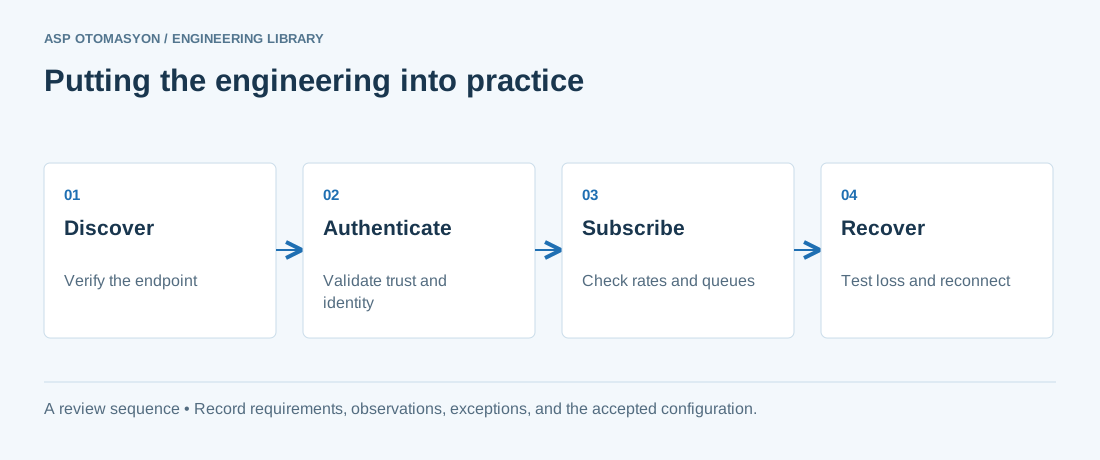
- Record the endpoint, supported security policies, application identity, certificate expiry, and user permissions.
- Verify the value, engineering unit, StatusCode, and source timestamp together at the receiving application.
- Test disconnection and recovery with representative subscriptions; preserve evidence of any data gaps or repeated values.
Follow an ASP project guide to connect the fundamentals with implementation and acceptance.
Primary references and further reading
Use the original specifications and product documentation for implementation details. The examples in this guide are illustrative engineering scenarios, not published project results.