
OPC UA separates transparent from non-transparent server redundancy and uses a ServiceLevel value to pick the server, so failover tests must check servers and clients.
A redundant OPC UA pair protects the plant only if the client moves to the healthy server and keeps its data, alarms, and history consistent. OPC UA defines how servers advertise health and how clients fail over, but it leaves each server's internal design to the vendor, so verify the design on the real network with the real clients.
This article covers the modes in OPC UA Parts 4 and 5, the requirements for redundant servers, a failover acceptance test with its evidence, and common failure modes. Statements about the specification come from Parts 4, 5, and 12 of the OPC Foundation online reference, release 1.05.07. Plant-level acceptance is covered in redundancy failover acceptance.
OPC UA distinguishes two modes. In transparent redundancy, the failover is invisible to the client. The servers share one virtual network address, an identical EndpointUrl and ServerUri, and even identical certificates and security settings, so the redundant set appears as one server. The client cannot choose which physical server it uses.
In non-transparent redundancy, each server has its own address, its own ApplicationUri, and its own certificate. The client must know the redundant set and perform the failover itself. The ServerRedundancy object in Part 5 reports the mode through RedundancySupport, with values NONE, COLD, WARM, HOT, TRANSPARENT, and HOT_AND_MIRRORED.
| Mode | What the client does | Who performs failover | Key constraint |
|---|---|---|---|
| Cold | Connects to one server at a time and waits for the backup if needed | Client | Backup may be powered off or not running the application |
| Warm | Monitors ServiceLevel on several servers; only the active one returns data | Client, which activates the backup | Backup cannot deliver full data, for example when a PLC allows one connection |
| Hot | Connects to two or more servers and subscribes on each | Client, which enables reporting on the next server | Each server stays connected to the data source, so changes must be buffered during failover |
| HotAndMirrored | Keeps one session and reads ServiceLevel on the others | Client, which opens a new secure channel to an alternate server | Servers mirror sessions, subscriptions, and sequence numbers |
| Transparent | Nothing; the client sees a single server | The redundant set itself | Failover is vendor specific behind the shared address |
ServiceLevel is a byte from 0 to 255 that tells a client how well a server can provide its data. Part 4 divides the range into sub-ranges. The Maintenance sub-range is 0, where new clients must not connect and connected clients disconnect. The NoData sub-range is 1, where a failed server has no data. The Degraded sub-range runs from 2 to 199, where part of the address space is out of service. The Healthy sub-range runs from 200 to 255.
Clients should connect to the server with the highest ServiceLevel. Once connected, a client should not fail over to another server while its current server stays accessible in the Healthy range. All servers in a redundant set must use the same ServiceLevel algorithm, which the vendor defines.
Part 4 also allows a server to leave the set through a shutdown, or by setting its ServiceLevel into the Maintenance sub-range, for example through the RequestServerStateChange method, which needs administrative credentials.
Test the production architecture, or a faithful copy, with one fault per run and every clock synchronized before the first run.
Follow an ASP project guide to connect the fundamentals with implementation and acceptance.
In transparent redundancy, the redundant servers share one address and one ServerUri, so the client sees a single server and has no failover actions. In non-transparent redundancy, each server has its own address and ApplicationUri, and the client must know the redundant set and perform the failover.
The client reads ServiceLevel from each server in the redundant set and connects to the server with the highest value. A value in the Healthy range, 200 to 255, means the server can deliver all of its data, and a client should not fail over away from a server that stays healthy. A value in the Degraded range means partial availability, and the client should move to a healthy server if one exists.
It can. The specification notes that cold and warm failover may lose data between the interruption of the active server and the client's first publish response from the backup. In hot failover, the client must size its subscription queue to buffer changes across that window. HotAndMirrored designs share session and subscription state, but the vendor must still demonstrate the result in the test.
Yes. Part 4 requires all servers in a redundant set to be synchronized with respect to time, and it names NTP or PTP as ways to achieve this. A client that compares timestamps across a failover will see false gaps or out-of-order data when the clocks disagree.
Inject each fault on the active server separately: stop the application, cut the network path, and restart the host. For each run, record the failover time, the ServiceLevel values, the data and alarm comparison, and the client's reconnect log. Compare node identifiers across the servers before the test. Repeat the test for failback, and keep the evidence with the test date and configuration.
Browse the related technical library or follow an ASP project guide to plan the implementation sequence.

Use the original specifications and product documentation for implementation details. Examples in this guide are illustrative engineering scenarios, not published project results.
","markdown":"# OPC UA Redundancy: Failover Models and How to Test Them\n\n> OPC UA separates transparent from non-transparent server redundancy and uses a ServiceLevel value to pick the server, so failover tests must check servers and…\n\n- Canonical URL: https://wiki.aspotomasyon.com/article/opc-ua-redundancy-failover-testing\n- Publisher: ASP OTOMASYON A.Ş. (ASP OTOMASYON Wiki)\n- Category: OPC Solutions\n- Published: 2026-10-11 · Updated: 2026-10-11\n- Reading time: 9 min · Language: English\n\nOPC UA separates transparent from non-transparent server redundancy and uses a ServiceLevel value to pick the server, so failover tests must check servers and clients.\n\n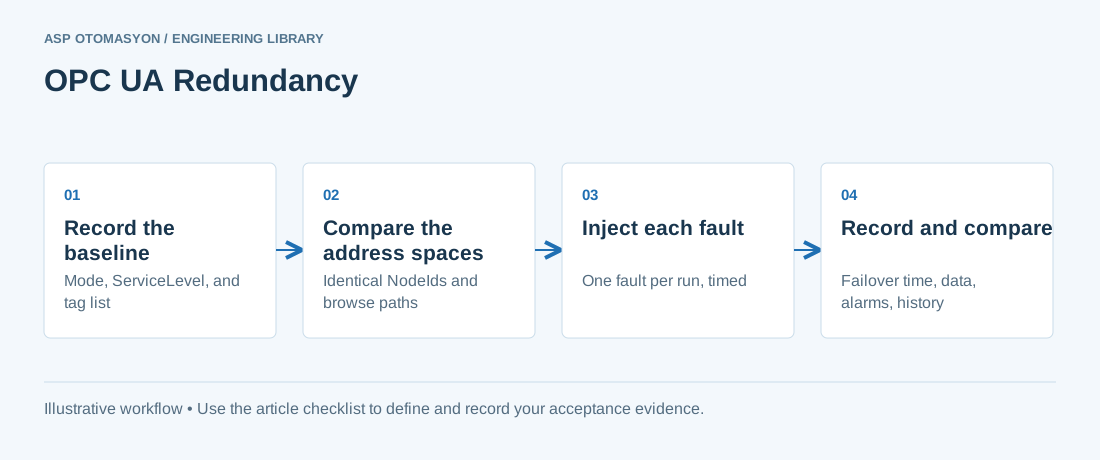\n\n*OPC UA Redundancy: Failover Models and How to Test Them — Record the baseline → Compare the address spaces → Inject each fault → Record and compare.*\n\nA redundant OPC UA pair protects the plant only if the client moves to the healthy server and keeps its data, alarms, and history consistent. OPC UA defines how servers advertise health and how clients fail over, but it leaves each server's internal design to the vendor, so verify the design on the real network with the real clients.\n\nThis article covers the modes in OPC UA Parts 4 and 5, the requirements for redundant servers, a failover acceptance test with its evidence, and common failure modes. Statements about the specification come from Parts 4, 5, and 12 of the OPC Foundation online reference, release 1.05.07. Plant-level acceptance is covered in [redundancy failover acceptance](https://wiki.aspotomasyon.com/article/redundancy-failover-acceptance).\n\n## Transparent and non-transparent redundancy\n\nOPC UA distinguishes two modes. In transparent redundancy, the failover is invisible to the client. The servers share one virtual network address, an identical EndpointUrl and ServerUri, and even identical certificates and security settings, so the redundant set appears as one server. The client cannot choose which physical server it uses.\n\nIn non-transparent redundancy, each server has its own address, its own ApplicationUri, and its own certificate. The client must know the redundant set and perform the failover itself. The ServerRedundancy object in Part 5 reports the mode through RedundancySupport, with values NONE, COLD, WARM, HOT, TRANSPARENT, and HOT_AND_MIRRORED.\n\n| Mode | What the client does | Who performs failover | Key constraint |\n| --- | --- | --- | --- |\n| Cold | Connects to one server at a time and waits for the backup if needed | Client | Backup may be powered off or not running the application |\n| Warm | Monitors ServiceLevel on several servers; only the active one returns data | Client, which activates the backup | Backup cannot deliver full data, for example when a PLC allows one connection |\n| Hot | Connects to two or more servers and subscribes on each | Client, which enables reporting on the next server | Each server stays connected to the data source, so changes must be buffered during failover |\n| HotAndMirrored | Keeps one session and reads ServiceLevel on the others | Client, which opens a new secure channel to an alternate server | Servers mirror sessions, subscriptions, and sequence numbers |\n| Transparent | Nothing; the client sees a single server | The redundant set itself | Failover is vendor specific behind the shared address |\n\n## ServiceLevel: how the client chooses a server\n\nServiceLevel is a byte from 0 to 255 that tells a client how well a server can provide its data. Part 4 divides the range into sub-ranges. The Maintenance sub-range is 0, where new clients must not connect and connected clients disconnect. The NoData sub-range is 1, where a failed server has no data. The Degraded sub-range runs from 2 to 199, where part of the address space is out of service. The Healthy sub-range runs from 200 to 255.\n\nClients should connect to the server with the highest ServiceLevel. Once connected, a client should not fail over to another server while its current server stays accessible in the Healthy range. All servers in a redundant set must use the same ServiceLevel algorithm, which the vendor defines.\n\nPart 4 also allows a server to leave the set through a shutdown, or by setting its ServiceLevel into the Maintenance sub-range, for example through the RequestServerStateChange method, which needs administrative credentials.\n\n## What must match across the redundant set\n\n- **Address space.** Identical NodeIds, browse paths, and structure. Only nodes in the local server namespace, such as server diagnostics, may differ, and a failing-over client should not need to translate browse paths.\n- **ServiceLevel logic.** The same algorithm in every server of the set.\n- **Time.** All servers synchronized, for example through NTP or PTP.\n- **EventIds.** In transparent and HotAndMirrored sets, EventIds are synchronized so that an event is not processed twice. In cold, warm, and hot sets, clients must handle unsynchronized EventIds and call ConditionRefresh after a failover.\n- **Timestamps.** When a server reports data from a downstream device, source timestamps should agree closely across the servers, and clients should prefer SourceTimestamp.\n- **Continuation points and state.** Clients must cope with lost continuation points, and HotAndMirrored servers mirror sessions, subscriptions, and sequence numbers.\n- **Certificates and discovery.** Non-transparent servers each have their own application URI and certificate, and register separately with the NTRS capability identifier, as Part 12 requires. Transparent sets are managed as one application.\n\n## A failover acceptance test\n\nTest the production architecture, or a faithful copy, with one fault per run and every clock synchronized before the first run.\n\n1. **Record the baseline.** Before the test, read the redundancy mode from the ServerRedundancy object, the RedundantServerArray with each server's ServiceLevel, the active server, and the list of test tags, alarms, and history items.\n2. **Compare the address spaces.** Browse the test items on each server, and compare NodeIds and browse paths. Record any difference outside the local namespace as a finding before the test continues.\n3. **Inject each fault separately.** Run three cases: stop the application on the active server, cut the network path to it, and restart its host. Record the time of each action from the synchronized clock.\n4. **Measure the switch.** Record the time from the first failed action to the first publish response from the new server, the ServiceLevel values during the switch, and whether the client reconnected without manual action. Queue sizing is covered in [OPC UA subscription sizing](https://wiki.aspotomasyon.com/article/opc-ua-subscription-sizing) .\n5. **Compare the data.** Compare values, quality, and SourceTimestamp for the test tags across the switch. Count gaps in sample values and sequence numbers, and record whether the client reported them.\n6. **Check alarms and history.** Confirm that the alarm list matches the active server after the switch, that ConditionRefresh was called where required, that no event was processed twice, and that history has no unexplained gap.\n7. **Test failback.** Restore the failed server, confirm that its ServiceLevel recovers, and observe whether the client switches. The specification does not expect a Hot-mode client to switch automatically back to a recovered server, so define the expected behaviour before the test.\n\n**Illustrative example**\n\nAssume a hot pair with two clients and a test that stops the application on the active server while the network stays up. Assume the backup's first publish response arrives 3 seconds after the fault, and the client's subscription queue holds those 3 seconds of changes. The client then calls ConditionRefresh, and its alarm list matches the backup. One short history gap is recorded against the acceptance limit. The figures are assumptions for illustration, not measured results.\n\n## Evidence to record at acceptance\n\n- The redundancy mode, RedundantServerArray, and ServiceLevel values before, during, and after each run, with timestamps.\n- A fault log for each case: action, time, operator, and reference clock.\n- The failover time for each case, from the first failed action to the first publish response from the new server.\n- A node comparison report for the test tags, alarms, and history items on every server in the set.\n- Client logs for reconnect, session activation, subscription transfer, and ConditionRefresh calls.\n- The data comparison for each switch, with counted gaps.\n\n## Common failure modes\n\n- **Split brain.** Parts 4 and 5 do not describe split-brain arbitration. Ask the vendor how the set decides the active server when the servers cannot see each other, and test by cutting the link between the servers.\n- **Data gaps after a switch.** The specification notes that cold and warm failover may lose data, and that hot failover depends on queue sizing. A client that treats every gap as a fault will fail too often, and one that ignores gaps will hide real losses.\n- **Certificates on one node only.** Non-transparent servers each need their own certificate, so a renewal done on one server leaves the others out of step. See [OPC UA certificate renewal planning](https://wiki.aspotomasyon.com/article/opc-ua-certificate-renewal-plan) .\n\n## Apply this to your project\n\n- Record the redundancy mode, the RedundantServerArray, and each server's ServiceLevel before every test.\n- Confirm that the test tags, alarms, and history items have identical NodeIds and browse paths on every server.\n- Confirm time synchronization on every server and on the test client before the test starts.\n- Inject each fault type separately, and record the failover time from the first failed action to the first new publish response.\n- Verify that the client calls ConditionRefresh where required, and that no event is processed twice.\n- Define and test the failback behaviour, including what happens when the failed server recovers.\n- Confirm the certificate and trust list state on every server in the redundant set.\n\n[Follow an ASP project guide](https://wiki.aspotomasyon.com/guides) to connect the fundamentals with implementation and acceptance.\n\n## Frequently asked questions\n\n### What is the difference between transparent and non-transparent OPC UA redundancy?\n\nIn transparent redundancy, the redundant servers share one address and one ServerUri, so the client sees a single server and has no failover actions. In non-transparent redundancy, each server has its own address and ApplicationUri, and the client must know the redundant set and perform the failover.\n\n### How does an OPC UA client choose the active server?\n\nThe client reads ServiceLevel from each server in the redundant set and connects to the server with the highest value. A value in the Healthy range, 200 to 255, means the server can deliver all of its data, and a client should not fail over away from a server that stays healthy. A value in the Degraded range means partial availability, and the client should move to a healthy server if one exists.\n\n### Does OPC UA failover lose data?\n\nIt can. The specification notes that cold and warm failover may lose data between the interruption of the active server and the client's first publish response from the backup. In hot failover, the client must size its subscription queue to buffer changes across that window. HotAndMirrored designs share session and subscription state, but the vendor must still demonstrate the result in the test.\n\n### Do redundant OPC UA servers need synchronized clocks?\n\nYes. Part 4 requires all servers in a redundant set to be synchronized with respect to time, and it names NTP or PTP as ways to achieve this. A client that compares timestamps across a failover will see false gaps or out-of-order data when the clocks disagree.\n\n### How should OPC UA redundancy be tested?\n\nInject each fault on the active server separately: stop the application, cut the network path, and restart the host. For each run, record the failover time, the ServiceLevel values, the data and alarm comparison, and the client's reconnect log. Compare node identifiers across the servers before the test. Repeat the test for failback, and keep the evidence with the test date and configuration.\n\n## Continue the engineering work\n\n- [OPC UA Aggregation Server Architectures](https://wiki.aspotomasyon.com/article/opc-ua-aggregation-server)\n- [Redundancy Failover Acceptance: Testing the Complete Control Path](https://wiki.aspotomasyon.com/article/redundancy-failover-acceptance)\n- [OPC UA Subscription Sizing: Sampling, Publishing, and Queues](https://wiki.aspotomasyon.com/article/opc-ua-subscription-sizing)\n- [Advanced Kepware: Alarms, Historical Data, and Redundancy](https://wiki.aspotomasyon.com/article/advanced-kepware-alarms-history-redundancy)\n- [Redundant Control System Architectures](https://wiki.aspotomasyon.com/article/redundant-control-system-architectures)\n\nBrowse the [related technical library](https://wiki.aspotomasyon.com/category/opc-solutions) or follow an [ASP project guide](https://wiki.aspotomasyon.com/guides) to plan the implementation sequence.\n\n\n\n*A conceptual OPC UA client/server path. Application certificates establish application trust; user authorization controls what a connected user may do.*\n\n## Primary references and further reading\n\nUse the original specifications and product documentation for implementation details. Examples in this guide are illustrative engineering scenarios, not published project results.\n\n- [OPC Foundation — OPC UA Part 4: Services (OPC 10000-4)](https://reference.opcfoundation.org/specs/OPC-10000-4)\n- [OPC Foundation — OPC UA Part 5: Information Model (OPC 10000-5)](https://reference.opcfoundation.org/specs/OPC-10000-5)\n- [OPC Foundation — OPC UA Part 12: Discovery and Global Services (OPC 10000-12)](https://reference.opcfoundation.org/specs/OPC-10000-12)\n\n---\n\nCite the canonical article: https://wiki.aspotomasyon.com/article/opc-ua-redundancy-failover-testing (OPC UA Redundancy: Failover Models and How to Test Them, ASP OTOMASYON, updated 2026-10-11).\n","headings":[{"id":"transparent-and-non-transparent-redundancy","title":"Transparent and non-transparent redundancy"},{"id":"servicelevel-how-the-client-chooses-a-server","title":"ServiceLevel: how the client chooses a server"},{"id":"what-must-match-across-the-redundant-set","title":"What must match across the redundant set"},{"id":"a-failover-acceptance-test","title":"A failover acceptance test"},{"id":"evidence-to-record-at-acceptance","title":"Evidence to record at acceptance"},{"id":"common-failure-modes","title":"Common failure modes"},{"id":"apply-this-to-your-project","title":"Apply this to your project"},{"id":"frequently-asked-questions","title":"Frequently asked questions"},{"id":"continue-the-engineering-work","title":"Continue the engineering work"},{"id":"primary-references-and-further-reading","title":"Primary references and further reading"}],"faq":[{"question":"What is the difference between transparent and non-transparent OPC UA redundancy?","answer":"In transparent redundancy, the redundant servers share one address and one ServerUri, so the client sees a single server and has no failover actions. In non-transparent redundancy, each server has its own address and ApplicationUri, and the client must know the redundant set and perform the failover."},{"question":"How does an OPC UA client choose the active server?","answer":"The client reads ServiceLevel from each server in the redundant set and connects to the server with the highest value. A value in the Healthy range, 200 to 255, means the server can deliver all of its data, and a client should not fail over away from a server that stays healthy. A value in the Degraded range means partial availability, and the client should move to a healthy server if one exists."},{"question":"Does OPC UA failover lose data?","answer":"It can. The specification notes that cold and warm failover may lose data between the interruption of the active server and the client's first publish response from the backup. In hot failover, the client must size its subscription queue to buffer changes across that window. HotAndMirrored designs share session and subscription state, but the vendor must still demonstrate the result in the test."},{"question":"Do redundant OPC UA servers need synchronized clocks?","answer":"Yes. Part 4 requires all servers in a redundant set to be synchronized with respect to time, and it names NTP or PTP as ways to achieve this. A client that compares timestamps across a failover will see false gaps or out-of-order data when the clocks disagree."},{"question":"How should OPC UA redundancy be tested?","answer":"Inject each fault on the active server separately: stop the application, cut the network path, and restart the host. For each run, record the failover time, the ServiceLevel values, the data and alarm comparison, and the client's reconnect log. Compare node identifiers across the servers before the test. Repeat the test for failback, and keep the evidence with the test date and configuration."}],"references":[{"name":"OPC Foundation — OPC UA Part 4: Services (OPC 10000-4)","url":"https://reference.opcfoundation.org/specs/OPC-10000-4"},{"name":"OPC Foundation — OPC UA Part 5: Information Model (OPC 10000-5)","url":"https://reference.opcfoundation.org/specs/OPC-10000-5"},{"name":"OPC Foundation — OPC UA Part 12: Discovery and Global Services (OPC 10000-12)","url":"https://reference.opcfoundation.org/specs/OPC-10000-12"}],"related":[{"slug":"kepware-driver-selection-architecture","title":"Kepware Driver Selection and Channel/Tag Architecture","summary":"KEPServerEX is the most widely deployed industrial connectivity platform: it converts dozens of native protocols — Siemens, Allen-Bradley, Modbus, DNP3…","category":{"slug":"opc-solutions","name":"OPC Solutions"},"url":"https://wiki.aspotomasyon.com/article/kepware-driver-selection-architecture","markdown_url":"https://wiki.aspotomasyon.com/article/kepware-driver-selection-architecture.md","api_url":"https://wiki.aspotomasyon.com/api/v1/articles/kepware-driver-selection-architecture","published":"2026-08-11T13:05:19+00:00","modified":"2026-09-13T11:07:23+00:00","reading_minutes":5,"word_count":921,"image":"https://wiki.aspotomasyon.com/assets/social/kepware-driver-selection-architecture-22591e1f10b4.png"},{"slug":"scada-system-architecture-design-patterns","title":"SCADA System Architecture and Design Patterns","summary":"Supervisory Control and Data Acquisition (SCADA) systems form the backbone of modern industrial monitoring and control.","category":{"slug":"automation-systems","name":"Automation Systems"},"url":"https://wiki.aspotomasyon.com/article/scada-system-architecture-design-patterns","markdown_url":"https://wiki.aspotomasyon.com/article/scada-system-architecture-design-patterns.md","api_url":"https://wiki.aspotomasyon.com/api/v1/articles/scada-system-architecture-design-patterns","published":"2026-05-13T12:07:53+00:00","modified":"2026-09-13T11:07:23+00:00","reading_minutes":9,"word_count":1887,"image":"https://wiki.aspotomasyon.com/assets/social/scada-system-architecture-design-patterns-d28081d36299.png"},{"slug":"redundancy-failover-acceptance","title":"Redundancy Failover Acceptance: Testing the Complete Control Path","summary":"Redundancy is useful only when the required function survives the failures the design intends to tolerate.","category":{"slug":"automation-systems","name":"Automation Systems"},"url":"https://wiki.aspotomasyon.com/article/redundancy-failover-acceptance","markdown_url":"https://wiki.aspotomasyon.com/article/redundancy-failover-acceptance.md","api_url":"https://wiki.aspotomasyon.com/api/v1/articles/redundancy-failover-acceptance","published":"2026-09-13T11:07:23+00:00","modified":"2026-09-13T11:07:23+00:00","reading_minutes":2,"word_count":343,"image":"https://wiki.aspotomasyon.com/assets/social/redundancy-failover-acceptance-1b2a4a68a814.png"},{"slug":"advanced-kepware-alarms-history-redundancy","title":"Advanced Kepware: Alarms, Historical Data, and Redundancy","summary":"KEPServerEX from PTC/Kepware is the most widely deployed OPC server in industrial automation, and most users only scratch the surface of its capabilities.","category":{"slug":"opc-solutions","name":"OPC Solutions"},"url":"https://wiki.aspotomasyon.com/article/advanced-kepware-alarms-history-redundancy","markdown_url":"https://wiki.aspotomasyon.com/article/advanced-kepware-alarms-history-redundancy.md","api_url":"https://wiki.aspotomasyon.com/api/v1/articles/advanced-kepware-alarms-history-redundancy","published":"2026-05-13T12:01:15+00:00","modified":"2026-09-13T11:07:23+00:00","reading_minutes":8,"word_count":1689,"image":"https://wiki.aspotomasyon.com/assets/social/advanced-kepware-alarms-history-redundancy-a11e2ccb1483.png"}],"citation":"ASP OTOMASYON. OPC UA Redundancy: Failover Models and How to Test Them. Updated 2026-10-11. https://wiki.aspotomasyon.com/article/opc-ua-redundancy-failover-testing"}}