
OPC UA Historical Access (HA) is the part of the OPC UA specification that standardizes reading and writing of historical process data. While live data access answers \"what is the value now?\", historical access answers \"what happened, when, and what was the value between two timestamps?\". Because HA is defined inside the same address space as live data, a single OPC UA client can browse, subscribe to live values, and retrieve history through one consistent interface — which is why historians, analytics platforms, and MES systems increasingly use UA HA instead of vendor-specific APIs.
OPC UA Part 11 (Historical Access) defines two main service groups:
\n\nHistorical data is exposed through HistoricalDataNodes (variables marked with the Historizing attribute) and through the server's HistoryServerCapabilities, which tells clients what the server supports: interpolation, aggregates, multiple time domains, and so on.
\n\nA raw read returns the stored samples as they were recorded: each sample has its value, quality, and source timestamp. Clients can read raw data between two timestamps, optionally bounded by a maximum number of values, and the server may return \"continuation points\" for paging through very large result sets.
\n\nRather than transferring thousands of raw samples, clients request aggregates — precomputed summaries over time intervals. The standard defines a large set of aggregates:
\n\n| Aggregate | Meaning |
|---|---|
| Average | Mean of values in the interval |
| Minimum / Maximum | Extreme values in the interval |
| Count | Number of values in the interval |
| DurationInState | How long a value stayed in a given state |
| Start / End / Delta | First, last, or change of value across the interval |
| TimeAverage / TimeAverage2 | Time-weighted average (correct for irregular sampling) |
| Total / Total2 | Sum over the interval (e.g., energy, flow totals) |
| PercentBad | Fraction of time the value was bad quality |
Aggregates are calculated by the server, which keeps the data volume small and the calculation consistent for all clients. A client requesting daily averages of a temperature trend receives one value per day, computed the same way for every consumer.
\n\nEvery stored sample carries two timestamps:
\n\nWell-designed historians preserve both and let clients read by either. Be aware of clock synchronization: if PLCs, gateways, and historian run on different clocks, source timestamps can be misleading. Use NTP/SNTP (or IEEE 1588/PTP where required) to keep the fleet synchronized; the time-quality of the samples is often recorded too.
\n\nOn most UA servers that support history, configuration involves:
\n\nMany plants use a dedicated data historian (see the Data Historian Selection and Deployment article) as the long-term store, with OPC UA HA as the interface. Typical architecture:
\n\nPLC / DCS --OPC UA--> Historian (collects + stores)\n |\n |--OPC UA HA--> MES / analytics / dashboards\n |--OPC UA HA--> Engineering analysis tools\n |--OPC UA HA--> Cloud data platform (edge relay)\nThe historian collects once and serves many consumers through UA HA, avoiding multiple collection paths and inconsistent stores. The same pattern works with the historian acting as a UA server in front of a SQL database.
\n\nOPC UA Historical Access turns process history into a standard, browsable service instead of a vendor-specific export. By using raw reads for analysis, aggregates for dashboards and reports, and a well-configured historian as the single store, plants get consistent, queryable, long-term process data that serves operations, engineering, and business systems alike.
Follow an ASP project guide to connect the fundamentals with implementation and acceptance.

Use the original specifications and product documentation for implementation details. The examples in this guide are illustrative engineering scenarios, not published project results.
","markdown":"# OPC UA Historical Access (HA) Explained\n\n> OPC UA Historical Access (HA) is the part of the OPC UA specification that standardizes reading and writing of historical process data.\n\n- Canonical URL: https://wiki.aspotomasyon.com/article/opc-ua-historical-access-guide\n- Publisher: ASP OTOMASYON A.Ş. (ASP OTOMASYON Wiki)\n- Category: OPC Solutions\n- Published: 2026-08-06 · Updated: 2026-09-13\n- Reading time: 5 min · Language: English\n\n**OPC UA Historical Access (HA)** is the part of the OPC UA specification that standardizes reading and writing of historical process data. While live data access answers \"what is the value now?\", historical access answers \"what happened, when, and what was the value between two timestamps?\". Because HA is defined inside the same address space as live data, a single OPC UA client can browse, subscribe to live values, and retrieve history through one consistent interface — which is why historians, analytics platforms, and MES systems increasingly use UA HA instead of vendor-specific APIs.\n\n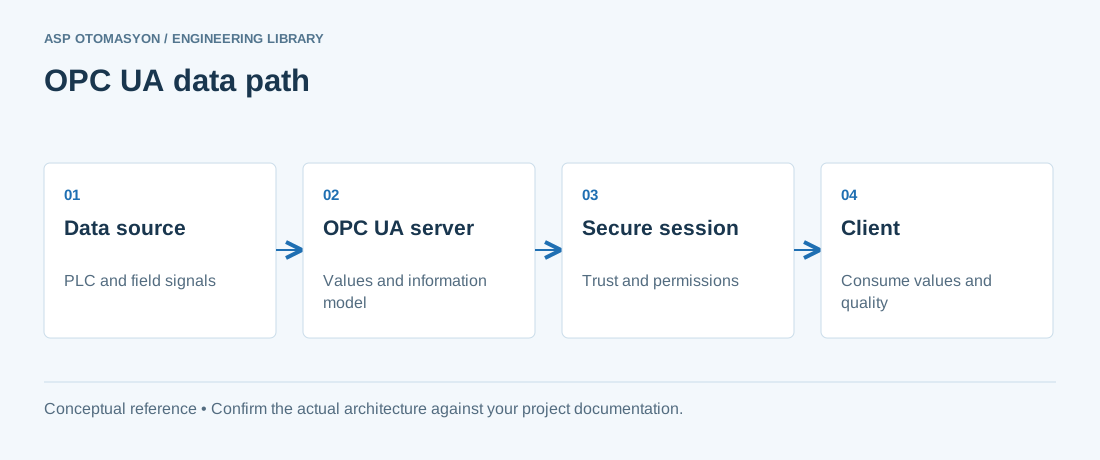\n\n*A conceptual OPC UA client/server path. Application certificates establish application trust; user authorization controls what a connected user may do.*\n\n## What Historical Access Covers\n\nOPC UA Part 11 (Historical Access) defines two main service groups:\n\n- **HistoricalRead** — retrieve stored values, events, or annotations for a time range.\n- **HistoricalUpdate** — insert, replace, or delete stored values and annotations (typically restricted to the server's own applications).\n\nHistorical data is exposed through **HistoricalDataNodes** (variables marked with the *Historizing* attribute) and through the server's **HistoryServerCapabilities**, which tells clients what the server supports: interpolation, aggregates, multiple time domains, and so on.\n\n## Reading Modes and Aggregates\n\n### Raw reads\n\nA raw read returns the stored samples as they were recorded: each sample has its value, quality, and source timestamp. Clients can read raw data between two timestamps, optionally bounded by a maximum number of values, and the server may return \"continuation points\" for paging through very large result sets.\n\n### Processed reads with aggregates\n\nRather than transferring thousands of raw samples, clients request **aggregates** — precomputed summaries over time intervals. The standard defines a large set of aggregates:\n\n| Aggregate | Meaning |\n| --- | --- |\n| Average | Mean of values in the interval |\n| Minimum / Maximum | Extreme values in the interval |\n| Count | Number of values in the interval |\n| DurationInState | How long a value stayed in a given state |\n| Start / End / Delta | First, last, or change of value across the interval |\n| TimeAverage / TimeAverage2 | Time-weighted average (correct for irregular sampling) |\n| Total / Total2 | Sum over the interval (e.g., energy, flow totals) |\n| PercentBad | Fraction of time the value was bad quality |\n\nAggregates are calculated by the server, which keeps the data volume small and the calculation consistent for all clients. A client requesting daily averages of a temperature trend receives one value per day, computed the same way for every consumer.\n\n## Time Domains and Timestamps\n\nEvery stored sample carries two timestamps:\n\n- **Source timestamp** — when the value was captured at the source (e.g., by the PLC).\n- **Server timestamp** — when the historian received it.\n\nWell-designed historians preserve both and let clients read by either. Be aware of clock synchronization: if PLCs, gateways, and historian run on different clocks, source timestamps can be misleading. Use NTP/SNTP (or IEEE 1588/PTP where required) to keep the fleet synchronized; the time-quality of the samples is often recorded too.\n\n## Historizing Configuration\n\nOn most UA servers that support history, configuration involves:\n\n1. **Selecting nodes:** mark which variables are historized (enable the Historizing attribute on the variable node).\n2. **Sampling:** define the capture rate (on-change, periodic, or both) and deadbands.\n3. **Storage:** choose the backing store — the server's internal database, a SQL database, or an external historian.\n4. **Retention:** set how long data is kept, and the roll-up strategy (e.g., keep raw data 1 year, hourly averages 5 years).\n5. **Continuity:** ensure the store survives restarts; a historian that loses the last 10 minutes on every restart is a liability.\n\n## Integrating HA with a Data Historian\n\nMany plants use a dedicated data historian (see the [Data Historian Selection and Deployment](https://wiki.aspotomasyon.com/article/data-historian-selection-deployment) article) as the long-term store, with OPC UA HA as the interface. Typical architecture:\n\n```\nPLC / DCS --OPC UA--> Historian (collects + stores)\n |\n |--OPC UA HA--> MES / analytics / dashboards\n |--OPC UA HA--> Engineering analysis tools\n |--OPC UA HA--> Cloud data platform (edge relay)\n```\n\nThe historian collects once and serves many consumers through UA HA, avoiding multiple collection paths and inconsistent stores. The same pattern works with the historian acting as a UA server in front of a SQL database.\n\n## Common Pitfalls\n\n- **Non-uniform timestamps.** Mixing source and server timestamps in one dataset corrupts intervals; pick one time basis and document it.\n- **Data loss on restart.** Verify that the historian flushes buffered data to durable storage before shutdown.\n- **Quality filtering.** Decide whether bad-quality samples are stored, and whether aggregates include them (PercentBad exists precisely to quantify this).\n- **Retention vs. disk.** Raw data grows quickly; plan retention and roll-up before the disk fills, and monitor historian disk usage.\n- **Client-side interpolation.** If the server cannot provide interpolated reads, clients must handle gaps themselves; check the server's capabilities first.\n\n## Summary\n\nOPC UA Historical Access turns process history into a standard, browsable service instead of a vendor-specific export. By using raw reads for analysis, aggregates for dashboards and reports, and a well-configured historian as the single store, plants get consistent, queryable, long-term process data that serves operations, engineering, and business systems alike.\n\n## Apply this to your project\n\n- Record the endpoint, supported security policies, application identity, certificate expiry, and user permissions.\n- Verify the value, engineering unit, StatusCode, and source timestamp together at the receiving application.\n- Test disconnection and recovery with representative subscriptions; preserve evidence of any data gaps or repeated values.\n\n[Follow an ASP project guide](https://wiki.aspotomasyon.com/guides) to connect the fundamentals with implementation and acceptance.\n\n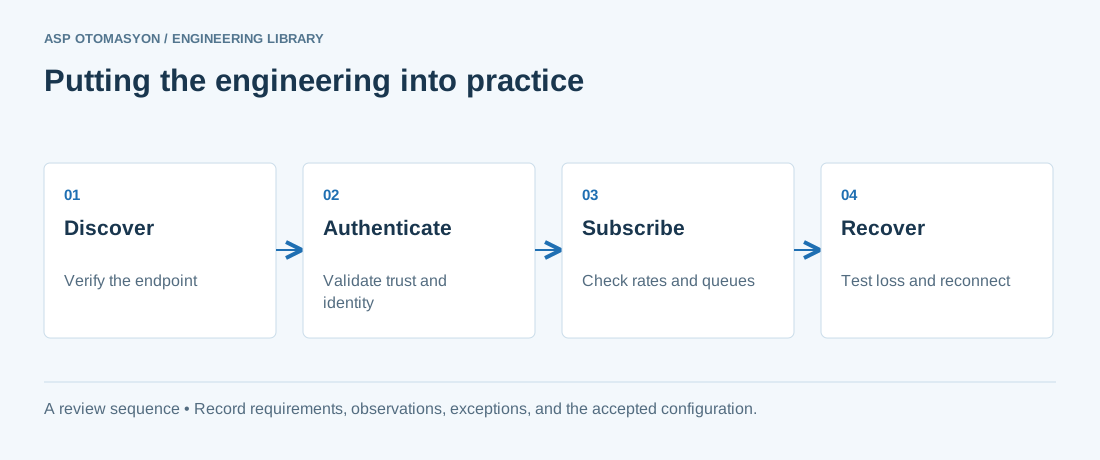\n\n*Engineering review sequence: Discover → Authenticate → Subscribe → Recover. Keep the recorded evidence with the accepted configuration.*\n\n## Primary references and further reading\n\nUse the original specifications and product documentation for implementation details. The examples in this guide are illustrative engineering scenarios, not published project results.\n\n- [OPC Foundation — OPC UA Part 4: Services](https://reference.opcfoundation.org/specs/OPC-10000-4/)\n- [OPC Foundation — OPC UA Part 2: Security Model](https://reference.opcfoundation.org/specs/OPC-10000-2/)\n\n---\n\nCite the canonical article: https://wiki.aspotomasyon.com/article/opc-ua-historical-access-guide (OPC UA Historical Access (HA) Explained, ASP OTOMASYON, updated 2026-09-13).\n","headings":[{"id":"what-historical-access-covers","title":"What Historical Access Covers"},{"id":"reading-modes-and-aggregates","title":"Reading Modes and Aggregates"},{"id":"time-domains-and-timestamps","title":"Time Domains and Timestamps"},{"id":"historizing-configuration","title":"Historizing Configuration"},{"id":"integrating-ha-with-a-data-historian","title":"Integrating HA with a Data Historian"},{"id":"common-pitfalls","title":"Common Pitfalls"},{"id":"summary","title":"Summary"},{"id":"apply-this-to-your-project","title":"Apply this to your project"},{"id":"primary-references-and-further-reading","title":"Primary references and further reading"}],"faq":[],"references":[{"name":"OPC Foundation — OPC UA Part 4: Services","url":"https://reference.opcfoundation.org/specs/OPC-10000-4/"},{"name":"OPC Foundation — OPC UA Part 2: Security Model","url":"https://reference.opcfoundation.org/specs/OPC-10000-2/"}],"related":[{"slug":"opc-ua-discovery-lds-gds","title":"OPC UA Discovery: LDS, LDS-ME, and Global Discovery Server Explained","summary":"OPC UA discovery lets clients find servers and their endpoints through a local discovery server on each host, a multicast extension, or a global discovery…","category":{"slug":"opc-solutions","name":"OPC Solutions"},"url":"https://wiki.aspotomasyon.com/article/opc-ua-discovery-lds-gds","markdown_url":"https://wiki.aspotomasyon.com/article/opc-ua-discovery-lds-gds.md","api_url":"https://wiki.aspotomasyon.com/api/v1/articles/opc-ua-discovery-lds-gds","published":"2026-10-11T11:46:21+00:00","modified":"2026-10-11T11:46:21+00:00","reading_minutes":9,"word_count":1844,"image":"https://wiki.aspotomasyon.com/assets/social/opc-ua-discovery-lds-gds-c305c85ac14a.png"},{"slug":"dnp3-iec-60870-5-104-telecontrol-protocols","title":"DNP3 and IEC 60870-5-104 Telecontrol Protocols Explained","summary":"DNP3 and IEC 60870-5-104 carry event-driven telecontrol data between a control center and remote sites, so design work centers on events, time stamps, and…","category":{"slug":"modern-connectivity","name":"Modern Connectivity"},"url":"https://wiki.aspotomasyon.com/article/dnp3-iec-60870-5-104-telecontrol-protocols","markdown_url":"https://wiki.aspotomasyon.com/article/dnp3-iec-60870-5-104-telecontrol-protocols.md","api_url":"https://wiki.aspotomasyon.com/api/v1/articles/dnp3-iec-60870-5-104-telecontrol-protocols","published":"2026-10-11T11:46:21+00:00","modified":"2026-10-11T11:46:21+00:00","reading_minutes":8,"word_count":1583,"image":"https://wiki.aspotomasyon.com/assets/social/dnp3-iec-60870-5-104-telecontrol-protocols-5b878a987e83.png"},{"slug":"energy-performance-indicators","title":"Energy Performance Indicators and Baselines (ISO 50006)","summary":"An ISO 50001 energy management system is built on measurement: without a way to quantify energy performance, improvement is an opinion.","category":{"slug":"energy-management-systems","name":"Energy Management Systems"},"url":"https://wiki.aspotomasyon.com/article/energy-performance-indicators","markdown_url":"https://wiki.aspotomasyon.com/article/energy-performance-indicators.md","api_url":"https://wiki.aspotomasyon.com/api/v1/articles/energy-performance-indicators","published":"2026-08-11T13:05:24+00:00","modified":"2026-09-13T11:07:23+00:00","reading_minutes":4,"word_count":793,"image":"https://wiki.aspotomasyon.com/assets/social/energy-performance-indicators-cb57d09936cf.png"},{"slug":"advanced-kepware-alarms-history-redundancy","title":"Advanced Kepware: Alarms, Historical Data, and Redundancy","summary":"KEPServerEX from PTC/Kepware is the most widely deployed OPC server in industrial automation, and most users only scratch the surface of its capabilities.","category":{"slug":"opc-solutions","name":"OPC Solutions"},"url":"https://wiki.aspotomasyon.com/article/advanced-kepware-alarms-history-redundancy","markdown_url":"https://wiki.aspotomasyon.com/article/advanced-kepware-alarms-history-redundancy.md","api_url":"https://wiki.aspotomasyon.com/api/v1/articles/advanced-kepware-alarms-history-redundancy","published":"2026-05-13T12:01:15+00:00","modified":"2026-09-13T11:07:23+00:00","reading_minutes":8,"word_count":1689,"image":"https://wiki.aspotomasyon.com/assets/social/advanced-kepware-alarms-history-redundancy-a11e2ccb1483.png"}],"citation":"ASP OTOMASYON. OPC UA Historical Access (HA) Explained. Updated 2026-09-13. https://wiki.aspotomasyon.com/article/opc-ua-historical-access-guide"}}