
Kepware Server (formerly KEPServerEX) is one of the most widely deployed OPC servers, providing connectivity to over 150 industrial protocols and device drivers. It serves as the communication bridge between PLCs, DCS controllers, sensors, and higher-level systems such as SCADA, MES, historians, and cloud platforms.
Before installing KEPServerEX, verify the following requirements:
\n\nC:\\Program Files\\Kepware\\KEPServerEX 6. Change only if required by your organization standards.KEPServerEX organizes communication in a hierarchy of Channels (protocol-level connections) and Devices (individual controllers on a channel):
\n\nPlant01_ModbusTCP).PLC_MixingTank01).| Parameter | Modbus TCP | Allen-Bradley EtherNet/IP | Siemens S7 Ethernet |
|---|---|---|---|
| Default Port | 502 | 44818 | 102 |
| Timeout (ms) | 3000 | 3000 | 3000 |
| Retry Count | 3 | 3 | 3 |
| Scan Rate (ms) | 1000 | 500 | 1000 |
| Max Tags per Request | 125 (read), 123 (write) | Varies by processor | Varies by PDU size |
| Communication Mode | Master/Slave | Class 1 Messaging | S7 Basic Communication |
| Auto-Demotion | Recommended: ON | Recommended: ON | Recommended: ON |
Tags represent individual data points. Configure tags carefully to ensure accurate data mapping:
\n\nTank01_Level_PV).40001 for Modbus Holding Register 1).KEPServerEX supports multiple layers of security:
\n\nKEPServerEX includes built-in diagnostic tools:
\n\n\nASP OTOMASYON A.Ş. and its subsidiaries OPCTurkey and ASP Dijital provide end-to-end industrial engineering solutions for process automation, data operations and AI.
Record the installed Kepware version, driver, device model, firmware, addressing convention, and requested update behavior. Product labels, licensing, and configuration screens vary by version; use the installed product help for exact options. Begin with a small read-only tag set and validate raw values, scaling, quality, and timestamps. Add load gradually and measure device response before applying one fast scan rate across the project.
Continue with the related practical guide.
Follow an ASP project guide to connect the fundamentals with implementation and acceptance.

Use the original specifications and product documentation for implementation details. The examples in this guide are illustrative engineering scenarios, not published project results.
","markdown":"# Kepware KEPServerEX Configuration Guide\n\n> Kepware Server (formerly KEPServerEX) is one of the most widely deployed OPC servers, providing connectivity to over 150 industrial protocols and device…\n\n- Canonical URL: https://wiki.aspotomasyon.com/article/kepware-kepserverex-configuration-guide\n- Publisher: ASP OTOMASYON A.Ş. (ASP OTOMASYON Wiki)\n- Category: OPC Solutions\n- Published: 2026-05-12 · Updated: 2026-09-13\n- Reading time: 5 min · Language: English\n\n**Kepware Server (formerly KEPServerEX)** is one of the most widely deployed OPC servers, providing connectivity to over 150 industrial protocols and device drivers. It serves as the communication bridge between PLCs, DCS controllers, sensors, and higher-level systems such as SCADA, MES, historians, and cloud platforms.\n\n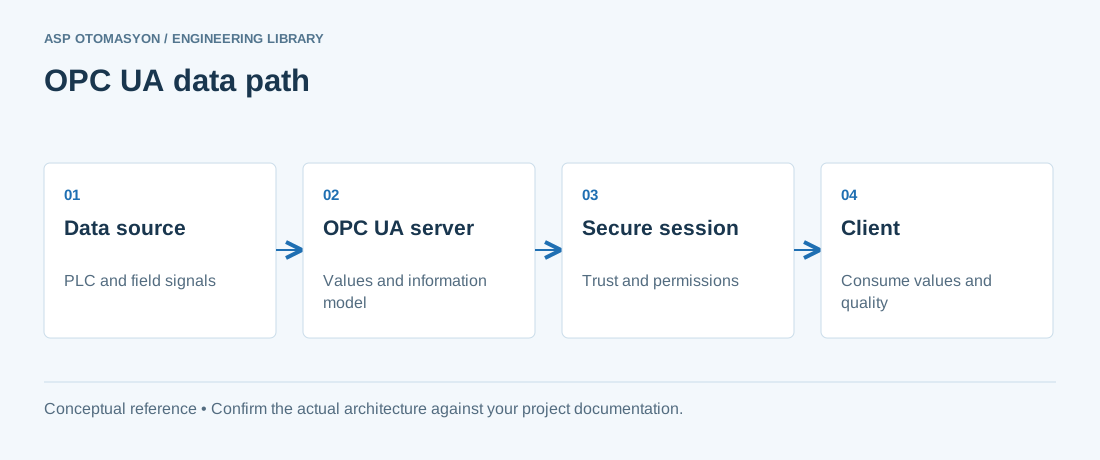\n\n*A conceptual OPC UA client/server path. Application certificates establish application trust; user authorization controls what a connected user may do.*\n\n## Prerequisites\n\nBefore installing KEPServerEX, verify the following requirements:\n\n- Windows Server 2016/2019/2022 or Windows 10/11 (64-bit)\n- .NET Framework 4.8 or later\n- Minimum 4 GB RAM, 2 GHz dual-core processor\n- Administrative privileges for installation\n- Network access to target devices (PLCs, instruments)\n- Valid Kepware license (demo mode allows 2-hour sessions with up to 100 tags)\n\n## Installation Steps\n\n1. **Download the Installer** — Obtain the latest KEPServerEX installer from the PTC/Kepware support portal. Verify the SHA-256 checksum before execution.\n2. **Run as Administrator** — Right-click the installer and select \"Run as administrator.\" Accept the UAC prompt.\n3. **Accept License Agreement** — Review and accept the end-user license agreement (EULA).\n4. **Choose Installation Directory** — The default path is `C:\\Program Files\\Kepware\\KEPServerEX 6` . Change only if required by your organization standards.\n5. **Select Drivers** — Choose the device drivers you need. Common selections: Allen-Bradley ControlLogix, Siemens S7 Ethernet, Modbus TCP/IP Ethernet, Mitsubishi Ethernet.\n6. **Complete Installation** — Click Install and wait. The KEPServerEX service starts automatically.\n7. **Apply License** — Launch KEPServerEX Administration, navigate to Help then License, and activate your product key.\n\n## Creating Channels and Devices\n\nKEPServerEX organizes communication in a hierarchy of **Channels** (protocol-level connections) and **Devices** (individual controllers on a channel):\n\n### Step 1: Create a Channel\n\n1. Right-click \"Connectivity\" in the project tree and select **New Channel** .\n2. Enter a descriptive channel name (e.g., `Plant01_ModbusTCP` ).\n3. Select the device driver (e.g., **Modbus TCP/IP Ethernet** ).\n4. Configure network adapter and communication parameters.\n5. Click **Finish** to create the channel.\n\n### Step 2: Add Devices\n\n1. Right-click the new channel and select **New Device** .\n2. Enter the device name (e.g., `PLC_MixingTank01` ).\n3. Enter the IP address or hostname of the target PLC.\n4. Configure device-specific parameters.\n5. Click **Finish** to add the device.\n\n## Configuration Parameters\n\n| Parameter | Modbus TCP | Allen-Bradley EtherNet/IP | Siemens S7 Ethernet |\n| --- | --- | --- | --- |\n| Default Port | 502 | 44818 | 102 |\n| Timeout (ms) | 3000 | 3000 | 3000 |\n| Retry Count | 3 | 3 | 3 |\n| Scan Rate (ms) | 1000 | 500 | 1000 |\n| Max Tags per Request | 125 (read), 123 (write) | Varies by processor | Varies by PDU size |\n| Communication Mode | Master/Slave | Class 1 Messaging | S7 Basic Communication |\n| Auto-Demotion | Recommended: ON | Recommended: ON | Recommended: ON |\n\n## Tag Configuration\n\nTags represent individual data points. Configure tags carefully to ensure accurate data mapping:\n\n1. Right-click the device and select **New Tag** .\n2. Enter the tag name using a consistent naming convention (e.g., `Tank01_Level_PV` ).\n3. Set the **Address** — the register location in the PLC (e.g., `40001` for Modbus Holding Register 1).\n4. Select the **Data Type** (Boolean, INT16, INT32, FLOAT, STRING, etc.).\n5. Configure **Scaling** if raw values need engineering unit conversion (e.g., raw 0–27648 to 0.0–100.0%).\n6. Set the **Scan Rate** — override the device default for tags requiring faster or slower polling.\n\n## Security Settings\n\nKEPServerEX supports multiple layers of security:\n\n- **User Manager** — Create local user accounts with specific permissions (read-only, read-write, admin).\n- **OPC UA Security** — Configure X.509 certificates for OPC UA connections with Sign or SignAndEncrypt mode.\n- **Application Authentication** — Restrict which OPC client applications are allowed to connect by whitelisting trusted application URIs.\n- **Encryption** — Enable TLS for HTTPS-based connections.\n- **Audit Logging** — Enable audit trails to record all configuration changes and user login events.\n\n## Diagnostics and Troubleshooting\n\nKEPServerEX includes built-in diagnostic tools:\n\n- **OPC Diagnostics** — View real-time statistics per channel: message count, error count, throughput, and last error code.\n- **Event Log** — Access via View then Event Log. Filter by severity (Info, Warning, Error).\n- **Device Status** — Green icon means connected, Yellow means warnings, Red means communication failure.\n- **Packet Trace** — Capture raw protocol packets for detailed communication analysis.\n\n> ASP OTOMASYON A.Ş. and its subsidiaries OPCTurkey and ASP Dijital provide end-to-end industrial engineering solutions for process automation, data operations and AI.\n\n---\n\n## References & Further Reading\n\n1. [PTC Kepware KEPServerEX Connectivity Platform](https://www.ptc.com/en/products/kepware/kepserverex) — Official product page with documentation, driver list, and system requirements for the KEPServerEX industrial connectivity platform.\n2. [PTC Kepware Technical Support and Knowledge Base](https://www.ptc.com/en/support/help/kepware) — Official support portal with configuration guides, troubleshooting articles, and best practices for KEPServerEX deployments.\n3. [Modbus Organization — Modbus TCP/IP and RTU Specifications](https://modbus.org) — Official Modbus protocol specifications maintained by the Modbus Organization, covering function codes, addressing, and data encoding.\n4. [ODVA — EtherNet/IP and CIP Protocol Specifications](https://www.odva.org) — Official specifications for EtherNet/IP and the Common Industrial Protocol used by Allen-Bradley/Rockwell Automation devices.\n5. [PTC Kepware Advanced Features — Alarms, Logging, Redundancy](https://support.ptc.com/help/kepware/features/en/) — Official documentation for KEPServerEX advanced capabilities including alarm configuration and ODBC data logging.\n\n## Commission the actual driver and device combination\n\nRecord the installed Kepware version, driver, device model, firmware, addressing convention, and requested update behavior. Product labels, licensing, and configuration screens vary by version; use the installed product help for exact options. Begin with a small read-only tag set and validate raw values, scaling, quality, and timestamps. Add load gradually and measure device response before applying one fast scan rate across the project.\n\nContinue with [the related practical guide](https://wiki.aspotomasyon.com/article/opc-ua-subscription-sizing).\n\n## Apply this to your project\n\n- Record the endpoint, supported security policies, application identity, certificate expiry, and user permissions.\n- Verify the value, engineering unit, StatusCode, and source timestamp together at the receiving application.\n- Test disconnection and recovery with representative subscriptions; preserve evidence of any data gaps or repeated values.\n\n[Follow an ASP project guide](https://wiki.aspotomasyon.com/guides) to connect the fundamentals with implementation and acceptance.\n\n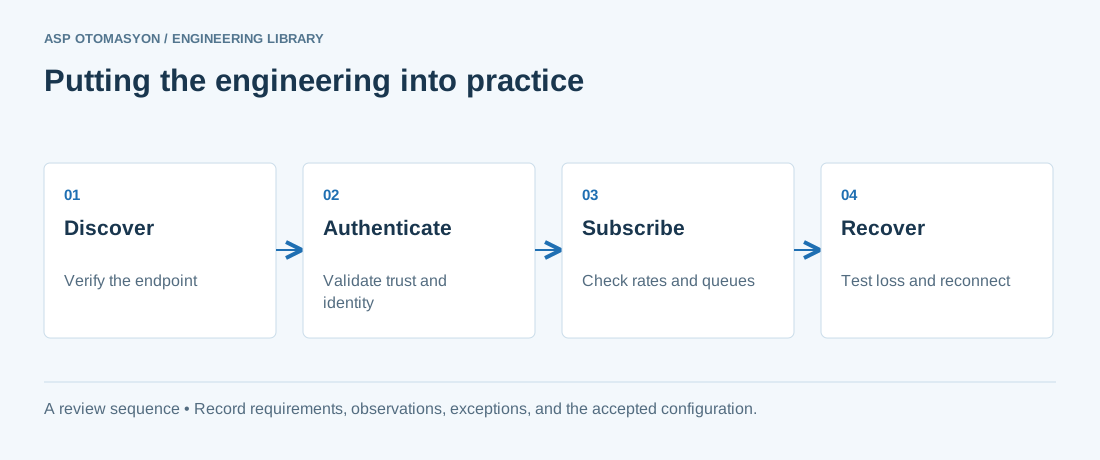\n\n*Engineering review sequence: Discover → Authenticate → Subscribe → Recover. Keep the recorded evidence with the accepted configuration.*\n\n## Primary references and further reading\n\nUse the original specifications and product documentation for implementation details. The examples in this guide are illustrative engineering scenarios, not published project results.\n\n- [OPC Foundation — OPC UA Part 4: Services](https://reference.opcfoundation.org/specs/OPC-10000-4/)\n- [OPC Foundation — OPC UA Part 2: Security Model](https://reference.opcfoundation.org/specs/OPC-10000-2/)\n\n---\n\nCite the canonical article: https://wiki.aspotomasyon.com/article/kepware-kepserverex-configuration-guide (Kepware KEPServerEX Configuration Guide, ASP OTOMASYON, updated 2026-09-13).\n","headings":[{"id":"prerequisites","title":"Prerequisites"},{"id":"installation-steps","title":"Installation Steps"},{"id":"creating-channels-and-devices","title":"Creating Channels and Devices"},{"id":"configuration-parameters","title":"Configuration Parameters"},{"id":"tag-configuration","title":"Tag Configuration"},{"id":"security-settings","title":"Security Settings"},{"id":"diagnostics-and-troubleshooting","title":"Diagnostics and Troubleshooting"},{"id":"references-further-reading","title":"References & Further Reading"},{"id":"commission-the-actual-driver-and-device-combination","title":"Commission the actual driver and device combination"},{"id":"apply-this-to-your-project","title":"Apply this to your project"},{"id":"primary-references-and-further-reading","title":"Primary references and further reading"}],"faq":[],"references":[{"name":"PTC Kepware KEPServerEX Connectivity Platform","url":"https://www.ptc.com/en/products/kepware/kepserverex"},{"name":"PTC Kepware Technical Support and Knowledge Base","url":"https://www.ptc.com/en/support/help/kepware"},{"name":"Modbus Organization — Modbus TCP/IP and RTU Specifications","url":"https://modbus.org"},{"name":"ODVA — EtherNet/IP and CIP Protocol Specifications","url":"https://www.odva.org"},{"name":"PTC Kepware Advanced Features — Alarms, Logging, Redundancy","url":"https://support.ptc.com/help/kepware/features/en/"},{"name":"OPC Foundation — OPC UA Part 4: Services","url":"https://reference.opcfoundation.org/specs/OPC-10000-4/"},{"name":"OPC Foundation — OPC UA Part 2: Security Model","url":"https://reference.opcfoundation.org/specs/OPC-10000-2/"}],"related":[{"slug":"advanced-kepware-alarms-history-redundancy","title":"Advanced Kepware: Alarms, Historical Data, and Redundancy","summary":"KEPServerEX from PTC/Kepware is the most widely deployed OPC server in industrial automation, and most users only scratch the surface of its capabilities.","category":{"slug":"opc-solutions","name":"OPC Solutions"},"url":"https://wiki.aspotomasyon.com/article/advanced-kepware-alarms-history-redundancy","markdown_url":"https://wiki.aspotomasyon.com/article/advanced-kepware-alarms-history-redundancy.md","api_url":"https://wiki.aspotomasyon.com/api/v1/articles/advanced-kepware-alarms-history-redundancy","published":"2026-05-13T12:01:15+00:00","modified":"2026-09-13T11:07:23+00:00","reading_minutes":8,"word_count":1689,"image":"https://wiki.aspotomasyon.com/assets/social/advanced-kepware-alarms-history-redundancy-a11e2ccb1483.png"},{"slug":"opc-ua-server-setup-with-kepware","title":"OPC UA Server Setup with Kepware","summary":"This guide walks through the complete process of configuring OPC UA server functionality in Kepware KEPServerEX. Once configured, OPC UA clients can securely…","category":{"slug":"technical-guides","name":"Technical Guides"},"url":"https://wiki.aspotomasyon.com/article/opc-ua-server-setup-with-kepware","markdown_url":"https://wiki.aspotomasyon.com/article/opc-ua-server-setup-with-kepware.md","api_url":"https://wiki.aspotomasyon.com/api/v1/articles/opc-ua-server-setup-with-kepware","published":"2026-05-12T12:47:31+00:00","modified":"2026-09-13T11:07:23+00:00","reading_minutes":5,"word_count":962,"image":"https://wiki.aspotomasyon.com/assets/social/opc-ua-server-setup-with-kepware-34ec46e25fac.png"},{"slug":"kepware-driver-selection-architecture","title":"Kepware Driver Selection and Channel/Tag Architecture","summary":"KEPServerEX is the most widely deployed industrial connectivity platform: it converts dozens of native protocols — Siemens, Allen-Bradley, Modbus, DNP3…","category":{"slug":"opc-solutions","name":"OPC Solutions"},"url":"https://wiki.aspotomasyon.com/article/kepware-driver-selection-architecture","markdown_url":"https://wiki.aspotomasyon.com/article/kepware-driver-selection-architecture.md","api_url":"https://wiki.aspotomasyon.com/api/v1/articles/kepware-driver-selection-architecture","published":"2026-08-11T13:05:19+00:00","modified":"2026-09-13T11:07:23+00:00","reading_minutes":5,"word_count":921,"image":"https://wiki.aspotomasyon.com/assets/social/kepware-driver-selection-architecture-22591e1f10b4.png"},{"slug":"opc-ua-mqtt-bridge-patterns","title":"OPC UA to MQTT Bridge Patterns","summary":"Industrial automation environments increasingly demand a two-tier data strategy: OPC UA for real-time, deterministic plant-floor communication and MQTT for…","category":{"slug":"opc-solutions","name":"OPC Solutions"},"url":"https://wiki.aspotomasyon.com/article/opc-ua-mqtt-bridge-patterns","markdown_url":"https://wiki.aspotomasyon.com/article/opc-ua-mqtt-bridge-patterns.md","api_url":"https://wiki.aspotomasyon.com/api/v1/articles/opc-ua-mqtt-bridge-patterns","published":"2026-05-13T12:01:15+00:00","modified":"2026-09-13T11:07:23+00:00","reading_minutes":8,"word_count":1649,"image":"https://wiki.aspotomasyon.com/assets/social/opc-ua-mqtt-bridge-patterns-b71382141389.png"}],"citation":"ASP OTOMASYON. Kepware KEPServerEX Configuration Guide. Updated 2026-09-13. https://wiki.aspotomasyon.com/article/kepware-kepserverex-configuration-guide"}}