
Find poorly performing control loops by ranking them on historian indicators such as mode, output saturation, error, and oscillation, then diagnose the cause before retuning.
Control loops degrade quietly. A valve sticks, a transmitter drifts, an operator leaves a loop in manual, or a process change makes the original tuning too aggressive. Each problem looks like a controller problem on the HMI, but the cause often sits in the measurement, the actuator, or the operating practice. A monitoring program turns historian data into a ranked list, so engineers spend their time where the process loss is largest.
This article covers the indicators that can be calculated from historian tags, a triage order that checks data, mode, actuator, tuning, and strategy in turn, and an illustrative ranking based on assumed values. The references are the control performance assessment literature. The indicators are screening tools: they show where to look, and they do not replace a plant test.
Loop performance changes over time even when the controller configuration does not. The usual causes fall into four groups.
Each indicator below can be calculated from a few tags. Calculate them over a window that includes normal production, and record the window, the scan rate, and any data gaps with the result. An indicator computed over one bad day describes the data, not the loop.
| Indicator | What it suggests | Data needed | First check |
|---|---|---|---|
| Time in automatic | Share of time the loop is in auto over the window | Mode tag, recorded on change | Low auto time points to an operating problem before a tuning problem |
| Output saturation | Share of time the output sits at a limit | Controller output and its limits | Saturation can mean an undersized valve, a wrong range, or demand beyond capacity |
| Error to setpoint | Average offset and spread of PV from SP | SP and PV on a common timeline | A persistent offset points to limits, mode, or structure before tuning |
| Oscillation check | Periodic swings in PV and output | PV and OP at a rate fast enough for the dynamics | Cycling in both PV and OP suggests tuning or valve stiction |
| Stick-slip signature | Output steps while PV responds slowly or in cycles | OP, and valve position feedback if available | Compare with positioner diagnostics before any retuning |
| Noise level | High-frequency variation in PV | PV at a rate above the process dynamics | High noise can make a well-tuned loop look poor |
A list of poorly scored loops is not yet a plan. Rank loops by the process loss they cause. Useful inputs are the effect on product quality or throughput, the energy cost of the variation, the consequence for equipment or the environment, and the effort to repair. A loop that controls a quality-critical variable at a bottleneck outranks a loop with the same indicators on a buffer tank.
The callout shows how the triage order and the impact scoring work together on a small set of loops.
A monitoring program has two outputs: a list of loops for operations and engineers to act on, and evidence for the tuning and valve maintenance plans. A valve with a stiction signature goes to maintenance with the stroke data attached, not to the tuning queue. A tuning change goes into the change log with the before and after indicators from the same window, so the effect can be verified.
The baseline depends on historian settings. Deadband and compression can remove the oscillation and noise that the indicators need; see historian deadband and compression selection.
Follow an ASP project guide to connect the fundamentals with implementation and acceptance.
Control loop performance monitoring uses historian data to calculate indicators for each loop, such as time in automatic, output saturation, error to setpoint, and signs of oscillation. The results rank loops so engineers can find those that cost the most product, energy, or stability. It is a screening method. A root cause still needs a check of the instrument, the valve, the mode, or the tuning.
Look for a stick-slip pattern: the controller output changes in steps, while the process variable responds slowly or in cycles that follow the steps. Valve position feedback, if available, helps confirm it. Verify with positioner diagnostics or a controlled step test before changing the tuning, because retuning does not remove the cause.
The sample rate must be fast enough to show the loop dynamics. Historian data recorded slowly, or with aggressive deadband compression, can hide the oscillation and noise that the indicators depend on. Set the scan rate and compression settings for the monitoring goal, and check them with a short high-resolution capture before relying on routine data.
Include them, but report them separately. A loop in manual is not an automatic control problem, so its controller indicators do not describe the controller. Time in manual is itself an indicator. It points to operating practice, instrument trust, or a loop operators do not believe in, and that reason should be found before any retuning.
Set the interval from how often the process, equipment, and control logic change. Use the same indicator definitions and window each time so trends stay comparable. Add a review after any major change to the process, the valve, or the control structure, and record each review's results.
Browse the related technical library or follow an ASP project guide to plan the implementation sequence.

Use the original specifications and product documentation for implementation details. Examples in this guide are illustrative engineering scenarios, not published project results.
","markdown":"# Control Loop Performance Monitoring: Finding Poorly Performing Loops\n\n> Find poorly performing control loops by ranking them on historian indicators such as mode, output saturation, error, and oscillation, then diagnose the cause…\n\n- Canonical URL: https://wiki.aspotomasyon.com/article/control-loop-performance-monitoring\n- Publisher: ASP OTOMASYON A.Ş. (ASP OTOMASYON Wiki)\n- Category: Automation Systems\n- Published: 2026-10-11 · Updated: 2026-10-11\n- Reading time: 8 min · Language: English\n\nFind poorly performing control loops by ranking them on historian indicators such as mode, output saturation, error, and oscillation, then diagnose the cause before retuning.\n\n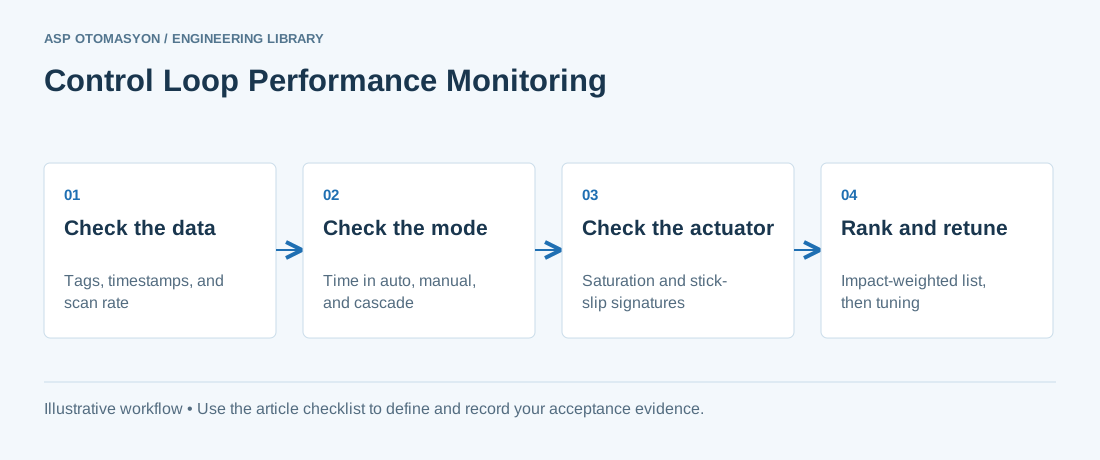\n\n*Control Loop Performance Monitoring: Finding Poorly Performing Loops — Check the data → Check the mode → Check the actuator → Rank and retune.*\n\nControl loops degrade quietly. A valve sticks, a transmitter drifts, an operator leaves a loop in manual, or a process change makes the original tuning too aggressive. Each problem looks like a controller problem on the HMI, but the cause often sits in the measurement, the actuator, or the operating practice. A monitoring program turns historian data into a ranked list, so engineers spend their time where the process loss is largest.\n\nThis article covers the indicators that can be calculated from historian tags, a triage order that checks data, mode, actuator, tuning, and strategy in turn, and an illustrative ranking based on assumed values. The references are the control performance assessment literature. The indicators are screening tools: they show where to look, and they do not replace a plant test.\n\n## Why control loops degrade\n\nLoop performance changes over time even when the controller configuration does not. The usual causes fall into four groups.\n\n- **Actuator faults** : valve stiction, backlash, a sticking positioner, or a weak air supply. Stiction makes the controller output cycle even when the process is steady.\n- **Measurement faults** : drift, fouling, or a noisy transmitter. A noisy process variable makes the controller act on noise.\n- **Process change** : a new feed, a higher throughput, or a change in dead time moves the process away from the tuning.\n- **Operating practice and design** : loops left in manual, frequent setpoint changes, or a single loop where a cascade or ratio structure is needed. The structures are described in [advanced process control strategies](https://wiki.aspotomasyon.com/article/advanced-process-control-strategies) .\n\n## Simple KPIs from historian data\n\nEach indicator below can be calculated from a few tags. Calculate them over a window that includes normal production, and record the window, the scan rate, and any data gaps with the result. An indicator computed over one bad day describes the data, not the loop.\n\n| Indicator | What it suggests | Data needed | First check |\n| --- | --- | --- | --- |\n| Time in automatic | Share of time the loop is in auto over the window | Mode tag, recorded on change | Low auto time points to an operating problem before a tuning problem |\n| Output saturation | Share of time the output sits at a limit | Controller output and its limits | Saturation can mean an undersized valve, a wrong range, or demand beyond capacity |\n| Error to setpoint | Average offset and spread of PV from SP | SP and PV on a common timeline | A persistent offset points to limits, mode, or structure before tuning |\n| Oscillation check | Periodic swings in PV and output | PV and OP at a rate fast enough for the dynamics | Cycling in both PV and OP suggests tuning or valve stiction |\n| Stick-slip signature | Output steps while PV responds slowly or in cycles | OP, and valve position feedback if available | Compare with positioner diagnostics before any retuning |\n| Noise level | High-frequency variation in PV | PV at a rate above the process dynamics | High noise can make a well-tuned loop look poor |\n\n## A triage order: data, mode, actuator, tuning, strategy\n\n1. **Check the data.** Confirm that PV, SP, OP, and mode tags update, that timestamps are sane, and that the scan rate can show the dynamics. Quality flags matter as well; see [OPC UA data quality and timestamps](https://wiki.aspotomasyon.com/article/opc-ua-data-quality-timestamps) .\n2. **Check the mode.** Review time in manual and in remote or cascade modes. A loop that spends most of its time in manual has an operating problem before it has a tuning problem.\n3. **Check the actuator.** Examine saturation, stick-slip signatures, and positioner diagnostics. Tuning cannot remove the effect of a sticky valve, so repair stiction and backlash first. See [control valve positioners](https://wiki.aspotomasyon.com/article/control-valve-positioners) .\n4. **Check the tuning.** Only after the first three checks, compare the oscillation and error with the expected response, and retune with a documented method. See [PID control tuning fundamentals](https://wiki.aspotomasyon.com/article/pid-control-tuning-fundamentals) .\n5. **Check the strategy.** If a loop with healthy data, mode, and actuator still misses its target, the structure may be wrong, and a cascade, ratio, feedforward, or multivariable approach may be needed.\n\n## Prioritize by process impact\n\nA list of poorly scored loops is not yet a plan. Rank loops by the process loss they cause. Useful inputs are the effect on product quality or throughput, the energy cost of the variation, the consequence for equipment or the environment, and the effort to repair. A loop that controls a quality-critical variable at a bottleneck outranks a loop with the same indicators on a buffer tank.\n\n- Score impact and repair effort separately, and start with high-impact, low-effort items.\n- Keep safety-related loops out of this ranking. Their design and changes belong to the safety lifecycle and to qualified functional-safety engineers.\n- Agree the ranking with operations before any setpoint, mode, or tuning change.\n\n## Worked ranking and what it shows\n\nThe callout shows how the triage order and the impact scoring work together on a small set of loops.\n\n**Illustrative example**\n\nAssume three loops in a monthly review, with invented values. Loop A (reactor temperature) is in automatic 60 percent of the time, mostly on the night shift, so its triage stops at the mode check. Loop B (distillation level) saturates its output 25 percent of the time with a stick-slip pattern, so its triage points to the valve and a maintenance work order. Loop C (feed flow) is in automatic 98 percent of the time with a small offset. Ranked by impact, A comes first because it affects a quality-critical variable, B second because its cause is clear and the repair is a known, low-effort job, and C last because it performs well. All values are assumptions, not measured results.\n\n## Connecting monitoring to tuning and valve maintenance\n\nA monitoring program has two outputs: a list of loops for operations and engineers to act on, and evidence for the tuning and valve maintenance plans. A valve with a stiction signature goes to maintenance with the stroke data attached, not to the tuning queue. A tuning change goes into the change log with the before and after indicators from the same window, so the effect can be verified.\n\nThe baseline depends on historian settings. Deadband and compression can remove the oscillation and noise that the indicators need; see [historian deadband and compression selection](https://wiki.aspotomasyon.com/article/historian-deadband-compression-selection).\n\n- **Routine indicators flag symptoms.** They do not prove causes, so a test is needed to confirm each one.\n- **Frequent setpoint changes** can make a well-tuned loop look poor on error indicators.\n- **Alarm context matters.** Repeated alarms on one loop can be a symptom of the same problem; see [alarm management per ISA-18.2](https://wiki.aspotomasyon.com/article/alarm-management-isa-18-2) .\n\n## Apply this to your project\n\n- Record the historian tags, scan rates, time window, and data gaps used for each indicator.\n- Confirm data quality and timestamps before ranking any loop.\n- Record the mode history for every loop, and flag loops with high time in manual.\n- Test suspected valve stiction with positioner diagnostics or a controlled step, and keep the result.\n- Attach before and after indicators from the same window to every tuning or maintenance change.\n- Review high-impact loops with operations before changing any setpoint, mode, or tuning.\n\n[Follow an ASP project guide](https://wiki.aspotomasyon.com/guides) to connect the fundamentals with implementation and acceptance.\n\n## Frequently asked questions\n\n### What is control loop performance monitoring?\n\nControl loop performance monitoring uses historian data to calculate indicators for each loop, such as time in automatic, output saturation, error to setpoint, and signs of oscillation. The results rank loops so engineers can find those that cost the most product, energy, or stability. It is a screening method. A root cause still needs a check of the instrument, the valve, the mode, or the tuning.\n\n### How do you detect valve stiction from historian data?\n\nLook for a stick-slip pattern: the controller output changes in steps, while the process variable responds slowly or in cycles that follow the steps. Valve position feedback, if available, helps confirm it. Verify with positioner diagnostics or a controlled step test before changing the tuning, because retuning does not remove the cause.\n\n### What sample rate does loop monitoring need?\n\nThe sample rate must be fast enough to show the loop dynamics. Historian data recorded slowly, or with aggressive deadband compression, can hide the oscillation and noise that the indicators depend on. Set the scan rate and compression settings for the monitoring goal, and check them with a short high-resolution capture before relying on routine data.\n\n### Should loops in manual be included in the ranking?\n\nInclude them, but report them separately. A loop in manual is not an automatic control problem, so its controller indicators do not describe the controller. Time in manual is itself an indicator. It points to operating practice, instrument trust, or a loop operators do not believe in, and that reason should be found before any retuning.\n\n### How often should control loop performance be reviewed?\n\nSet the interval from how often the process, equipment, and control logic change. Use the same indicator definitions and window each time so trends stay comparable. Add a review after any major change to the process, the valve, or the control structure, and record each review's results.\n\n## Continue the engineering work\n\n- [PID Control Tuning Fundamentals](https://wiki.aspotomasyon.com/article/pid-control-tuning-fundamentals)\n- [Control Valve Positioners: Types and Smart Features](https://wiki.aspotomasyon.com/article/control-valve-positioners)\n- [Advanced Process Control Strategies: Cascade, Ratio and Feedforward](https://wiki.aspotomasyon.com/article/advanced-process-control-strategies)\n- [Alarm Management per ISA-18.2](https://wiki.aspotomasyon.com/article/alarm-management-isa-18-2)\n- [Historian Deadband and Compression: Keeping the Data That Matters](https://wiki.aspotomasyon.com/article/historian-deadband-compression-selection)\n\nBrowse the [related technical library](https://wiki.aspotomasyon.com/category/automation-systems) or follow an [ASP project guide](https://wiki.aspotomasyon.com/guides) to plan the implementation sequence.\n\n\n\n*Conceptual control-system layers. Safety functions, communication paths, and redundancy must be designed for the application; the diagram is not a wiring or safety design.*\n\n## Primary references and further reading\n\nUse the original specifications and product documentation for implementation details. Examples in this guide are illustrative engineering scenarios, not published project results.\n\n- [Springer — Jelali, Control Performance Management in Industrial Automation (2013)](https://doi.org/10.1007/978-1-4471-4546-2)\n- [Springer — Choudhury, Shah and Thornhill, Diagnosis of Process Nonlinearities and Valve Stiction (2008)](https://doi.org/10.1007/978-3-540-79224-6)\n- [IFAC — Thornhill and Horch, Advances and new directions in plant-wide controller performance assessment (2006)](https://doi.org/10.3182/20060402-4-br-2902.00029)\n\n---\n\nCite the canonical article: https://wiki.aspotomasyon.com/article/control-loop-performance-monitoring (Control Loop Performance Monitoring: Finding Poorly Performing Loops, ASP OTOMASYON, updated 2026-10-11).\n","headings":[{"id":"why-control-loops-degrade","title":"Why control loops degrade"},{"id":"simple-kpis-from-historian-data","title":"Simple KPIs from historian data"},{"id":"a-triage-order-data-mode-actuator-tuning-strategy","title":"A triage order: data, mode, actuator, tuning, strategy"},{"id":"prioritize-by-process-impact","title":"Prioritize by process impact"},{"id":"worked-ranking-and-what-it-shows","title":"Worked ranking and what it shows"},{"id":"connecting-monitoring-to-tuning-and-valve-maintenance","title":"Connecting monitoring to tuning and valve maintenance"},{"id":"apply-this-to-your-project","title":"Apply this to your project"},{"id":"frequently-asked-questions","title":"Frequently asked questions"},{"id":"continue-the-engineering-work","title":"Continue the engineering work"},{"id":"primary-references-and-further-reading","title":"Primary references and further reading"}],"faq":[{"question":"What is control loop performance monitoring?","answer":"Control loop performance monitoring uses historian data to calculate indicators for each loop, such as time in automatic, output saturation, error to setpoint, and signs of oscillation. The results rank loops so engineers can find those that cost the most product, energy, or stability. It is a screening method. A root cause still needs a check of the instrument, the valve, the mode, or the tuning."},{"question":"How do you detect valve stiction from historian data?","answer":"Look for a stick-slip pattern: the controller output changes in steps, while the process variable responds slowly or in cycles that follow the steps. Valve position feedback, if available, helps confirm it. Verify with positioner diagnostics or a controlled step test before changing the tuning, because retuning does not remove the cause."},{"question":"What sample rate does loop monitoring need?","answer":"The sample rate must be fast enough to show the loop dynamics. Historian data recorded slowly, or with aggressive deadband compression, can hide the oscillation and noise that the indicators depend on. Set the scan rate and compression settings for the monitoring goal, and check them with a short high-resolution capture before relying on routine data."},{"question":"Should loops in manual be included in the ranking?","answer":"Include them, but report them separately. A loop in manual is not an automatic control problem, so its controller indicators do not describe the controller. Time in manual is itself an indicator. It points to operating practice, instrument trust, or a loop operators do not believe in, and that reason should be found before any retuning."},{"question":"How often should control loop performance be reviewed?","answer":"Set the interval from how often the process, equipment, and control logic change. Use the same indicator definitions and window each time so trends stay comparable. Add a review after any major change to the process, the valve, or the control structure, and record each review's results."}],"references":[{"name":"Springer — Jelali, Control Performance Management in Industrial Automation (2013)","url":"https://doi.org/10.1007/978-1-4471-4546-2"},{"name":"Springer — Choudhury, Shah and Thornhill, Diagnosis of Process Nonlinearities and Valve Stiction (2008)","url":"https://doi.org/10.1007/978-3-540-79224-6"},{"name":"IFAC — Thornhill and Horch, Advances and new directions in plant-wide controller performance assessment (2006)","url":"https://doi.org/10.3182/20060402-4-br-2902.00029"}],"related":[{"slug":"machine-commissioning-fat-sat","title":"Machine Commissioning: FAT, SAT and Startup Checklists","summary":"Commissioning is the structured process of proving that a machine or system works as designed — from the first power-on to productive operation.","category":{"slug":"automation-systems","name":"Automation Systems"},"url":"https://wiki.aspotomasyon.com/article/machine-commissioning-fat-sat","markdown_url":"https://wiki.aspotomasyon.com/article/machine-commissioning-fat-sat.md","api_url":"https://wiki.aspotomasyon.com/api/v1/articles/machine-commissioning-fat-sat","published":"2026-08-11T13:05:19+00:00","modified":"2026-09-13T11:07:23+00:00","reading_minutes":5,"word_count":933,"image":"https://wiki.aspotomasyon.com/assets/social/machine-commissioning-fat-sat-42eb5a5f88ea.png"},{"slug":"control-valve-positioners","title":"Control Valve Positioners: Types and Smart Features","summary":"Control valve positioners are the final element of most control loops: they take the controller's command and position the valve accurately and repeatably.","category":{"slug":"field-devices-instrumentation","name":"Field Devices & Instrumentation"},"url":"https://wiki.aspotomasyon.com/article/control-valve-positioners","markdown_url":"https://wiki.aspotomasyon.com/article/control-valve-positioners.md","api_url":"https://wiki.aspotomasyon.com/api/v1/articles/control-valve-positioners","published":"2026-08-06T12:26:37+00:00","modified":"2026-09-13T11:07:23+00:00","reading_minutes":5,"word_count":966,"image":"https://wiki.aspotomasyon.com/assets/social/control-valve-positioners-f6a050ac0672.png"},{"slug":"pharmaceutical-water-systems","title":"Pharmaceutical Water Systems: Design, Validation and Automation","summary":"Water is the most used raw material in pharmaceutical manufacturing — and the most regulated.","category":{"slug":"process-industries-solutions","name":"Process Industries Solutions"},"url":"https://wiki.aspotomasyon.com/article/pharmaceutical-water-systems","markdown_url":"https://wiki.aspotomasyon.com/article/pharmaceutical-water-systems.md","api_url":"https://wiki.aspotomasyon.com/api/v1/articles/pharmaceutical-water-systems","published":"2026-08-11T13:05:24+00:00","modified":"2026-09-13T16:44:25+00:00","reading_minutes":4,"word_count":786,"image":"https://wiki.aspotomasyon.com/assets/social/pharmaceutical-water-systems-6726ec1611cb.png"},{"slug":"isa-101-high-performance-hmi-design","title":"ISA-101 High-Performance HMI Design","summary":"The way operators interact with industrial processes has not meaningfully changed in decades — until now.","category":{"slug":"technical-guides","name":"Technical Guides"},"url":"https://wiki.aspotomasyon.com/article/isa-101-high-performance-hmi-design","markdown_url":"https://wiki.aspotomasyon.com/article/isa-101-high-performance-hmi-design.md","api_url":"https://wiki.aspotomasyon.com/api/v1/articles/isa-101-high-performance-hmi-design","published":"2026-05-13T12:02:57+00:00","modified":"2026-09-13T11:07:23+00:00","reading_minutes":9,"word_count":1766,"image":"https://wiki.aspotomasyon.com/assets/social/isa-101-high-performance-hmi-design-11e417f21511.png"}],"citation":"ASP OTOMASYON. Control Loop Performance Monitoring: Finding Poorly Performing Loops. Updated 2026-10-11. https://wiki.aspotomasyon.com/article/control-loop-performance-monitoring"}}